

TL;DR
In this article, I’ve captured my 3 months of real experience building agentic workflows for my crypto and equity research work
as a researcher, the hardest part is synthesizing myriad data, stats, opinions, and insights into a cohesive story; prior to agents this process took weeks to days depending on the depth of the final output, now I can squeeze the same quality of output to hours and days
the real deal isn’t setting up the LLM or the agent harness, the real kicker is the second brain - that to me is the single biggest takeaway building a repeatable agentic research model
In this piece, I drill down the exact systems, sub-systems, and the exact commands you can use to replicate the framework (and apply it to your own unique use cases)
do note, this is for me, and as such there might be areas you might wanna overlook, I recommend copy pasting the whole article inside your favorite LLM of choice, and then asking him to explain it back, and also interviewing you to build your own custom agentic setup by learning the mental model, architecture, and system wide thinking extracted from my specific approach
happy reading...
Introduction
Every research note you write today starts from zero.
You opened a tab this morning, typed in the token, the sector, the angle you wanted to think through. The model asked you what you meant. You explained the framework. You explained that you cite sources inline, that conviction tiers are High / Medium / Speculative, that you do not use em dashes (yeah ik this is the number one AI giveaway lmao). You spent the first forty minutes of the session building the context the model would forget the moment you closed the tab. When you opened a different tab tomorrow, on a different project, you did the same thing again. Last week, on this same project, you did it for the third time. You have explained your research framework to an AI four times, because it has no memory of the first three.
This is not researching, its paying the same cost over and over for context you have already built, in conversations that compound nowhere. The work you did three weeks ago on this token is buried in a chat history you will never search. The CT take that flagged the kill condition is in a screenshot somewhere on the desktop. The note got published, did well, and is now structurally inaccessible to your own future research. Six months in, you have produced forty research notes, and the cumulative knowledge sitting in queryable form is approximately what it was the day you started.
The real cost of treating AI as a chatbot is not the subscription price, Its the opportunity cost of your time better spent elsewhere doing quality creative stuff.
The alternative is not a better chatbot. It is a different relationship with the tool entirely.
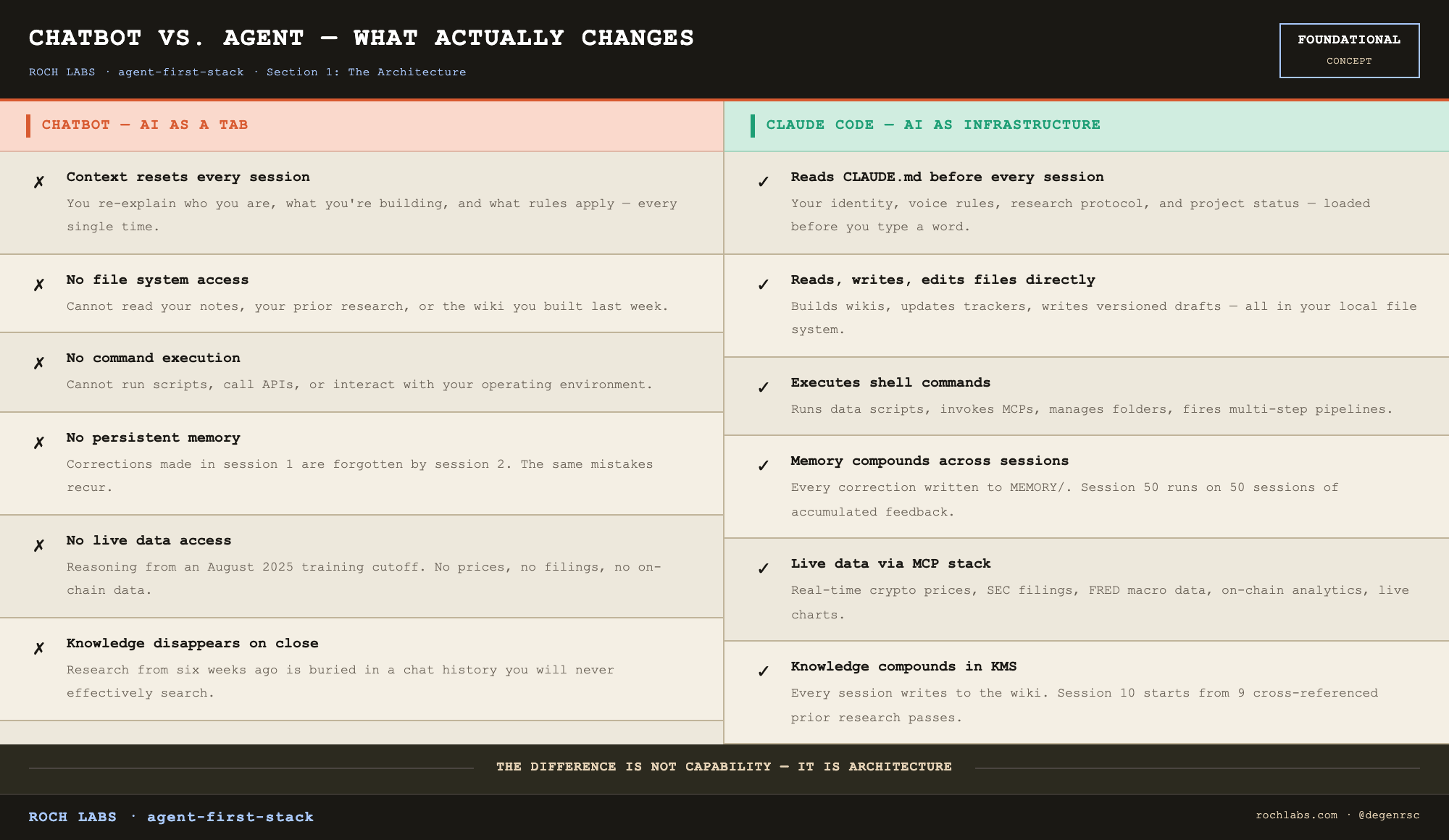
You type `claude` inside a project folder. Before the cursor returns, the agent has read three files. A global identity document at `~/.claude/CLAUDE.md` that tells it who you are, what you are building, what your voice rules are, and what research workflow you follow. A project document at the folder root that tells it the wiki is on v2, that kill-my-thesis returned PUBLISHABLE forty minutes ago, that the next step is voice calibration on draft v1. A memory index of every correction you have made across the prior fifty sessions, including the one from three weeks ago when you flagged a sourcing pattern it had been using wrong. The agent does not greet you. It tells you where you left off, and it tells you what the next step is. The session begins already briefed.
That shift is the conceptual core of this article. From AI as a tab in your browser to AI as an operating layer in your file system. From a tool that forgets you between sessions to infrastructure that compounds across all of them. From re-deriving context every morning to a knowledge environment that the agent reads from and writes to as the primary mode of work.
This article documents that build from scratch. The system has been running in production since January 2026, and what follows is my specific experience creating it from nothing. (note: I have zero coding/tech skills so this is easy to do for anyone).
The endgame of this guide
Before the architecture, the output. Proof before pitch.
The system described here runs two AI agents, five language models, and a stack of data tools. On a typical week, it produces a daily intelligence brief synthesized from five data sources and delivered to Telegram at 6:30 AM IST before markets open, between 8 and 12 research notes across tokens, equities, and macro, an automated evening position alert that pulls live prices against open trades and sends them at 7:00 PM, and a knowledge base with 19 cross-referenced pages across tokens, sectors, theses, and macro frameworks, updated after every session and readable by both agents.
The tracked research record across 41 published calls: 66 percent win rate, 244 percent average return on closed positions.
That is not the output of a researcher using AI as a search assistant. It is the output of an operation where the agent is the primary research operator and the researcher is the editor.
What it costs ($$) to make it happen?
The cost question comes early because you should make the “is this worth my time” decision before you’re halfway through the article. Here is the honest answer response:
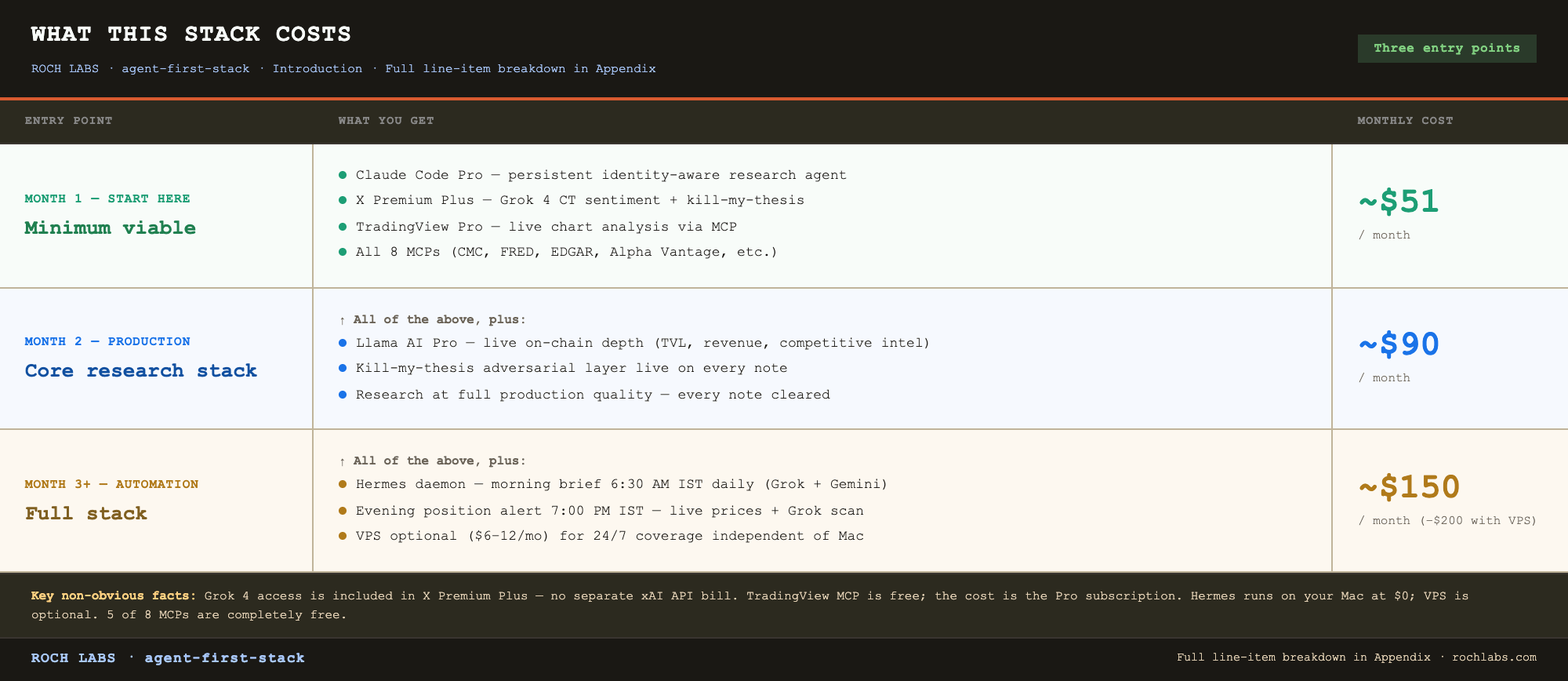
Full breakdown with line items in the appendix.
A few notes on the figures, because the cost model is non-obvious and most readers will read the table wrong on first pass. Grok access for CT sentiment and kill-my-thesis comes through the X Premium Plus subscription, not a separate xAI API bill. TradingView MCP is free; the cost is the TradingView Pro subscription required to run the desktop app. Hermes runs locally on a Mac at no additional cost, so the minimum viable build does not require a VPS. A $6 to $12 VPS becomes worth adding once the daemon is producing daily output you depend on while traveling or sleeping, and that decision belongs to Phase 2, not Phase 1.
The minimum viable stack at $51 a month gives you a persistent, identity-aware research agent, CT sentiment via Grok’s native X search, and professional chart analysis via TradingView MCP. That is not a trivial capability set for $51.
The full stack at $150 to $200 a month is what this article documents. It is the operating cost of a solo research operation that produces institutional-grade output across crypto, equities, and macro. For reference, a single Bloomberg terminal seat runs $2,000 a month. A junior research analyst at a fund costs $8,000 to $12,000 a month. The comparison is imperfect but the order of magnitude is real.
What this is and what it is not
This is a system design document. Every section is a layer of a working architecture, documented at the level of specificity required to actually build it. Terminal commands are exact. File paths are real. Cost estimates are pulled from live invoices. The adversarial layer has rejected publishable theses on $ETH, $KAS, and $NEAR in the past 90 days, and the verdicts are quoted in Section 6 with the actual report language rather than paraphrase.
This is not a prompt engineering tutorial. It is not a list of AI tools to evaluate. It is not a speculative vision of how agents might work someday.
The single most important concept in the article is the one already named above. A chatbot takes a message and returns a response. Context resets every session. The AI has no access to your files, no ability to run commands, no persistent state, no memory of what you told it last week. An AI agent embedded in your file system is architecturally different across every one of those dimensions. It reads your identity from a configuration file before every session. It writes and edits files. It executes shell commands. It calls live data tools. It maintains a memory system that persists across sessions and compounds with every correction you make. It is infrastructure, not a tab.
That infrastructure is what this article shows you how to build.
What you need
A Mac is the preferred environment. Linux works for everything in this stack except the TradingView MCP, which requires the Mac desktop application running in remote debug mode. Windows is not covered.
You do not need to write code. You need terminal comfort. If you have ever run `npm install` or `pip install` and edited a plain text configuration file without breaking it, you have the required baseline. Every step in the article is configuration and command execution, not programming.
Plan for 10 to 15 hours of initial setup. Most of that goes into the first pass through Sections 2 through 5: installing Claude Code, building the KMS folder structure, wiring in the MCPs, and configuring the multi-LLM pipeline. After the build is running, the ongoing operating cost is 1 to 2 hours a day, and a meaningful portion of that is reading the morning brief on the phone before the workday begins.
The last requirement is the one most readers underestimate. The willingness to run the system manually before automating it. Sections 2 through 8 describe a manual research workflow. Section 4 (Hermes) describes how to automate it. The automation only works if the manual workflow is clean, and the manual workflow only gets clean by being run by hand for long enough to feel where it breaks. Phase 1 before Phase 2. Always. Section 9 returns to this principle and gives it the weight it deserves.
How this article is structured
Nine sections, an appendix, and a progressive build path threaded through all of them.
Section 1 maps the full architecture: five layers, the two-agent split, the multi-LLM routing logic, and the four knowledge persistence mechanisms. Read it first regardless of where you plan to start building.
Section 2 covers Claude Code. Installation, the CLAUDE.md identity layer, the memory system, the skills framework. This is the foundation. Build it before anything else.
Section 3 covers the KMS, the structured second brain that turns scattered research into compounding knowledge. Folder architecture, the universal project structure, the LLM-maintained wiki, and AGENTS.md as the single source of truth both agents read.
Section 4 covers Hermes, the autonomous agent. Installation, Telegram setup, cron jobs, the auth.json key vault, the Claude Code delegation pattern, and VPS configuration. This is Phase 2 of the build. Sections 2, 3, 5, 6, and 7 work completely without Hermes, and if you are not ready for a VPS or a background daemon on first read, skip Section 4. Come back when the manual system is producing daily output and you have something worth automating.
Section 5 covers the MCP stack: eight data tools that give the agent access to live markets, the data scripts efficiency principle that keeps the cost model bounded, and the TradingView MCP setup that requires the most careful configuration of any tool in the stack.
Section 6 covers the multi-LLM architecture: five models, four roles, and the one structural argument that determines the entire routing logic. This is the most non-obvious chapter and the one where the system’s integrity actually lives. The three real kill-my-thesis verdicts on $ETH, $KAS, and $NEAR are quoted verbatim.
Section 7 covers the research workflow: a nine-step protocol with no-skip rules and a full session walkthrough from project setup to published note with real timings.
Section 8 covers content operations: the publishing sequence, the call tracker, the trade journal, and the flywheel that turns one research session into three publishable artifacts without doubling the production effort.
Section 9 covers where the build is now, what is automated versus still manual, and what the next twelve months build toward. It also closes a loop this introduction opened.
Read in order on first pass. Return to individual sections as reference.
Section 1: The Architecture
The system has five layers. Each one exists because a specific thing breaks without it. Understanding what each layer fixes is more useful than understanding how it works, so start there.
The five failure modes of manual research, and what fixes each:
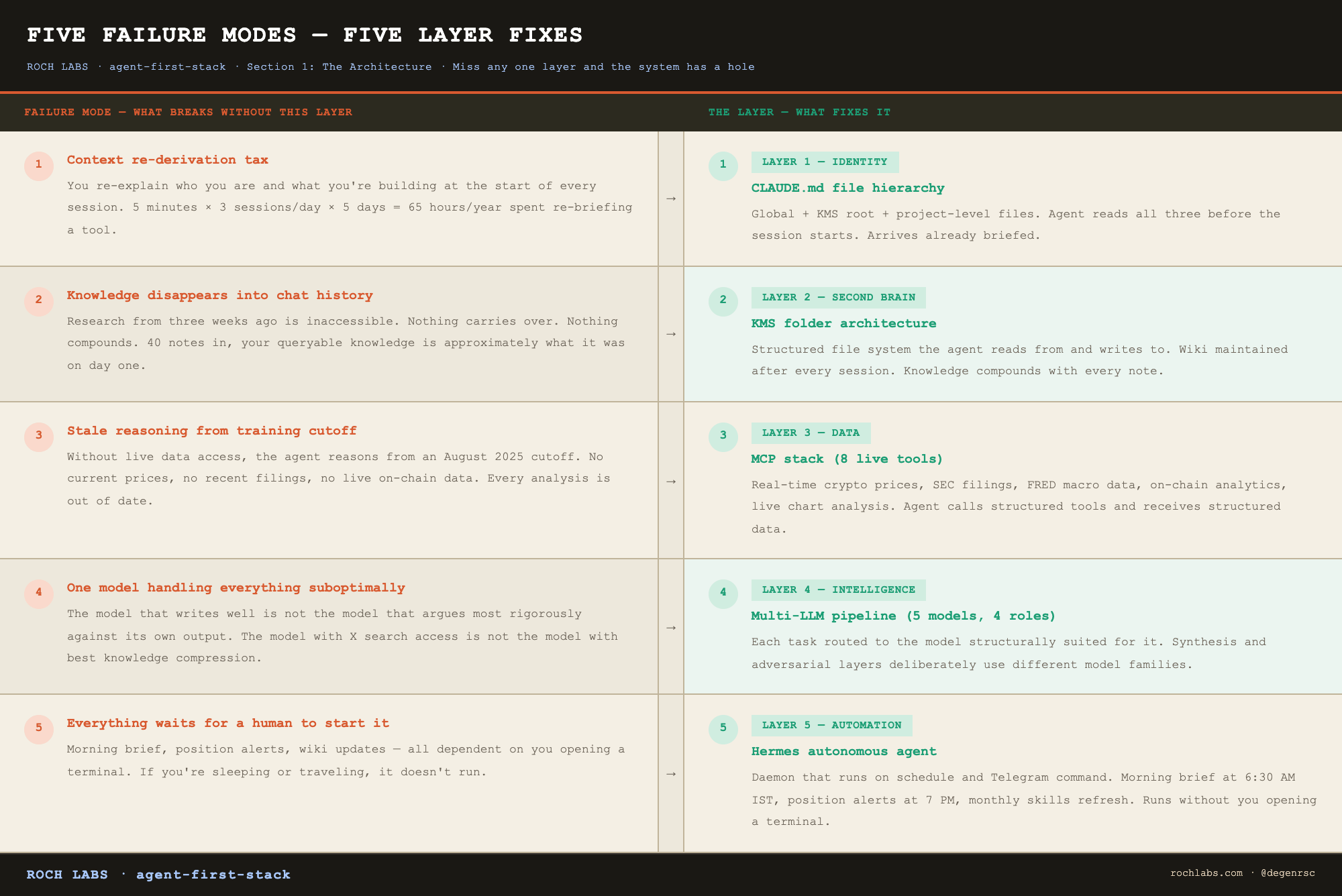
Fix all five and you have a research operation. Miss any one of them and the system has a hole that shows up in the output.
The five layers
Layer 1: Identity: CLAUDE.md files tell the agent who you are, what rules it follows, what project it is currently working on, and where everything lives in your file system. Two types: a global file that applies to every session, and a project file that applies to the current research folder. The agent reads both before it says a word. The result: every session begins already briefed.
Layer 2: Second Brain: The KMS (Knowledge Management System) is a structured folder architecture that gives the agent a persistent, organized environment to read from and write to. It contains a wiki that grows after every research session, a memory system that survives across sessions, and a single source of truth file that both agents stay synchronized on. This is the layer that makes knowledge compound rather than disappear.
Layer 3: Data: MCPs (Model Context Protocol tools) are the mechanism by which the agent accesses live data. Without them, the agent is limited to its training cutoff. With them, it has real-time access to crypto prices, equity filings, macro indicators, on-chain DEX data, and live chart analysis. Eight MCPs are active in this stack. The data layer is what makes the agent’s analysis current rather than stale.
Layer 4: Intelligence: Four language models, each with a specific role. The model that writes well is not the model that argues most rigorously against its own output. The model with native X search access is not the model with the best knowledge compression. Routing tasks to the wrong model is not just suboptimal, for adversarial work, it is actively harmful. The multi-LLM layer assigns each task to the model structurally suited for it.
Layer 5: Automation: Hermes is the second agent. It runs as a daemon on a server, listens for scheduled triggers and Telegram commands, and executes pipelines without human initiation. Daily intelligence brief, position alerts, wiki updates, skills monitoring, all of it runs without you opening a terminal. This is the layer that makes the system an operation rather than a tool.
The two-agent split
Two agents, one shared knowledge environment, a clear division of labor.
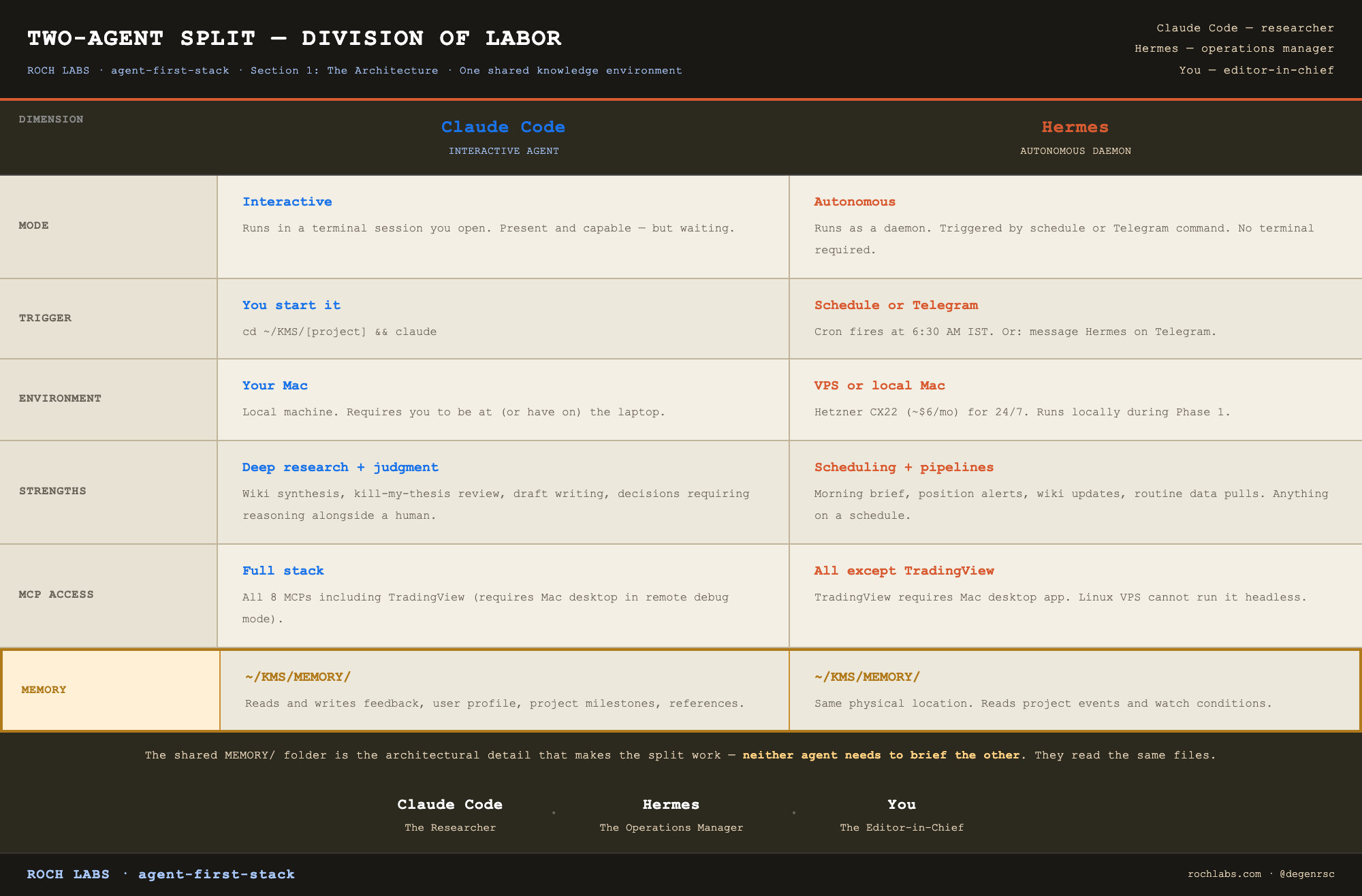
Claude Code is the researcher. Hermes is the operations manager. You are the editor-in-chief.
The shared memory folder is the architectural detail that makes this split work. Both agents read and write to the same physical location. Claude Code writes feedback memories and user profile updates. Hermes writes project event logs and watch condition triggers. Neither agent needs to brief the other, they read the same files.
A note on Hermes for first-time builders: Sections 2, 3, 5, 6, and 7 of this article, covering Claude Code, KMS, the MCP stack, the multi-LLM layer, and the research workflow, are fully functional without Hermes. Hermes is Phase 2. The correct build sequence is to run the manual research system first, understand what each step costs you in time and friction, and then automate what you have proven works. Automating a process you do not yet understand produces faster confusion, not faster output. Skip Section 4 on first read if you are not ready for a VPS.
The multi-LLM logic
One model doing everything is the most common mistake in AI research setups. The reasoning for avoiding it has nothing to do with benchmark scores.
Consider the tasks involved in one research note: searching X for CT sentiment, building a structured knowledge base from raw data, stress-testing the thesis for structural flaws, and writing the final 1,500-word note in a consistent voice. These tasks have different capability requirements. More importantly, one of them, the adversarial layer, has an independence requirement.
If Claude Opus 4.7 synthesizes the wiki and Claude Opus 4.8 runs the kill-my-thesis check, you are asking the same model family, same training data, same RLHF process, same embedded priors, to critique its own output. That is not independence. It is a model reviewing itself with a slightly different temperature setting.
Grok 4 is trained by xAI on different data with different objectives. Its priors are not Claude’s priors. When Grok returns a NEEDS WORK verdict on a thesis that Claude built, that verdict reflects a genuinely different perspective. That is what makes the adversarial layer structurally valid rather than performative.
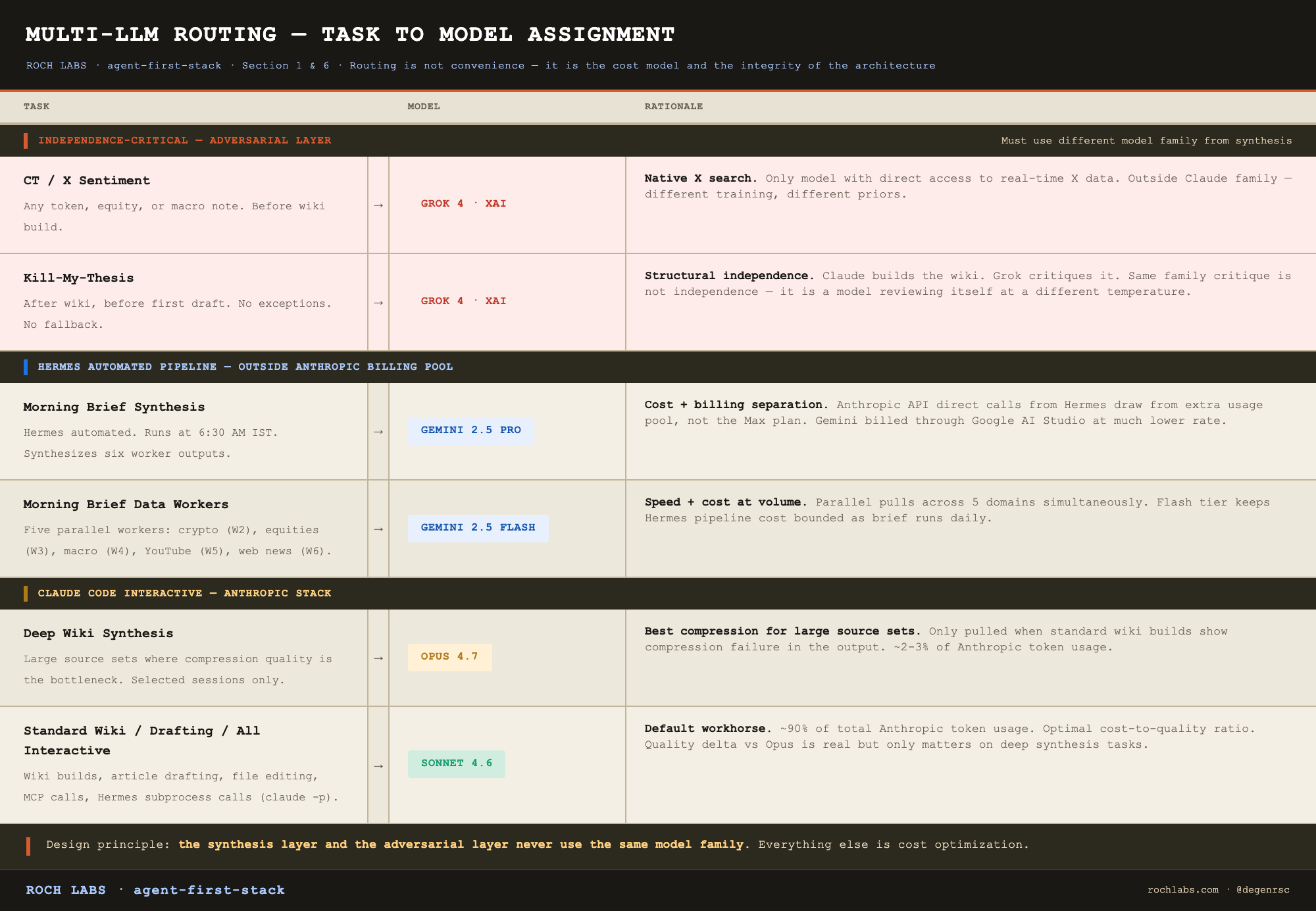
Cost discipline follows from this routing. Gemini handles Hermes synthesis and workers. Opus is reserved for the deep wiki builds where compression quality is the bottleneck. Grok runs on CT sentiment and kill-my-thesis. 90% of Anthropic token usage is Sonnet 4.6. That is intentional, save the expensive models for the tasks where model selection actually changes the output.
The four knowledge layers
Four distinct persistence mechanisms, each with a different scope and update frequency. Three of them store what the agent knows. The fourth tells it how to behave, and it is the one read first.
The CLAUDE.md hierarchy: the instruction and context stack
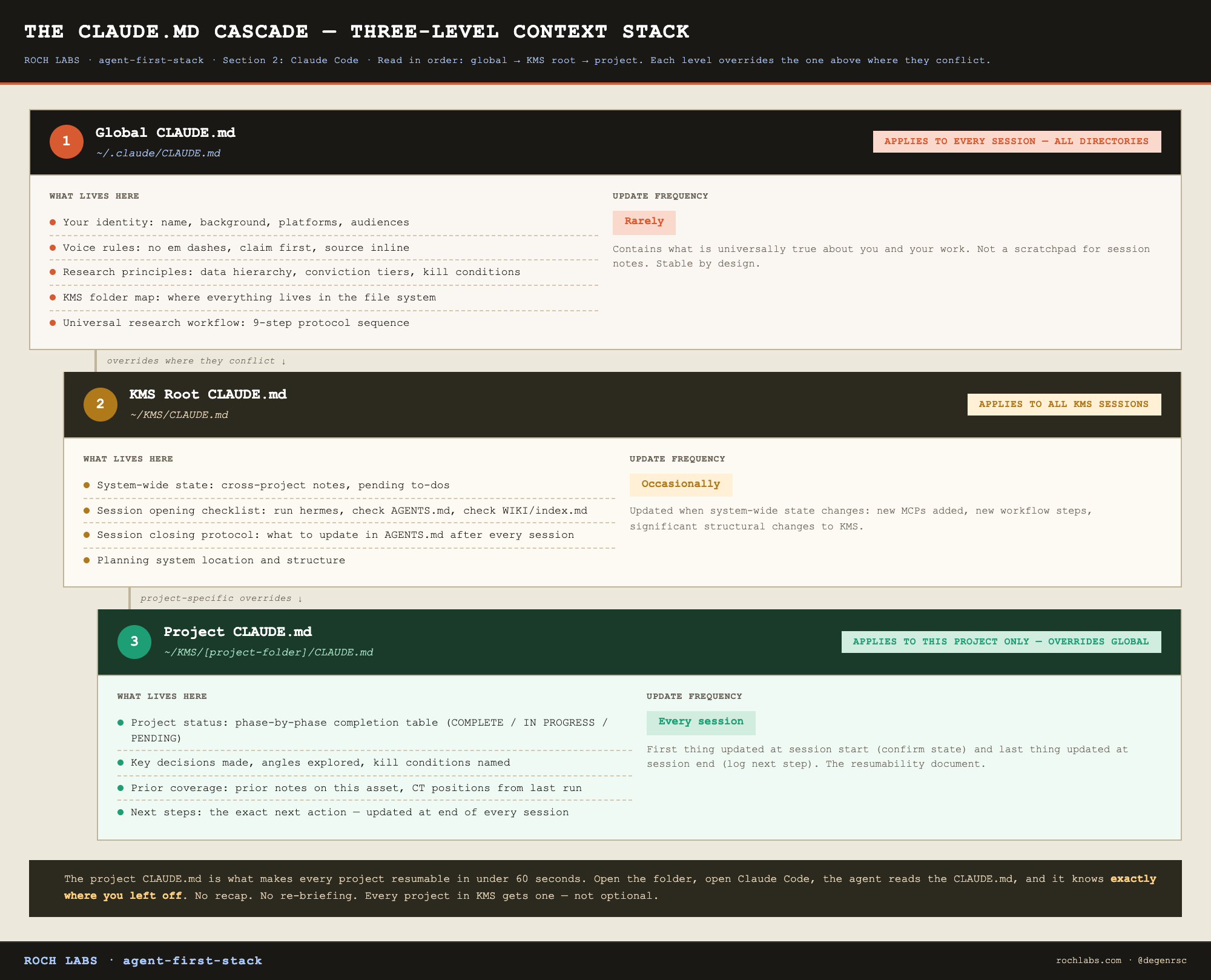
Before the agent touches AGENTS.md, WIKI/, or MEMORY/, it reads the CLAUDE.md files. These are plain text documents that scope the agent’s behavior for the current session. They operate at three levels:
`~/.claude/CLAUDE.md`: global. Your identity, universal voice rules, research principles, the KMS folder map. Applies to every session regardless of which directory you open.
`~/KMS/CLAUDE.md`: KMS root. System-wide context: cross-project notes, pending work, session closing protocol. Applies to all KMS sessions.
`~/KMS/[project]/CLAUDE.md`: project level. Status, decisions made, angles explored, kill conditions, what’s next. Applies only to the current project.
The project-level CLAUDE.md is the mechanism that makes every project resumable without re-briefing. Open a token research folder and the agent already knows the wiki is built, kill-my-thesis returned NEEDS WORK on the Toccata sell-the-news risk, and the next step is fixing that section before drafting v1. No recap required.
Every project in the KMS gets its own CLAUDE.md. This is not optional housekeeping, it is the document that accumulates the institutional memory of that specific project across every session you run on it.
The remaining three layers:
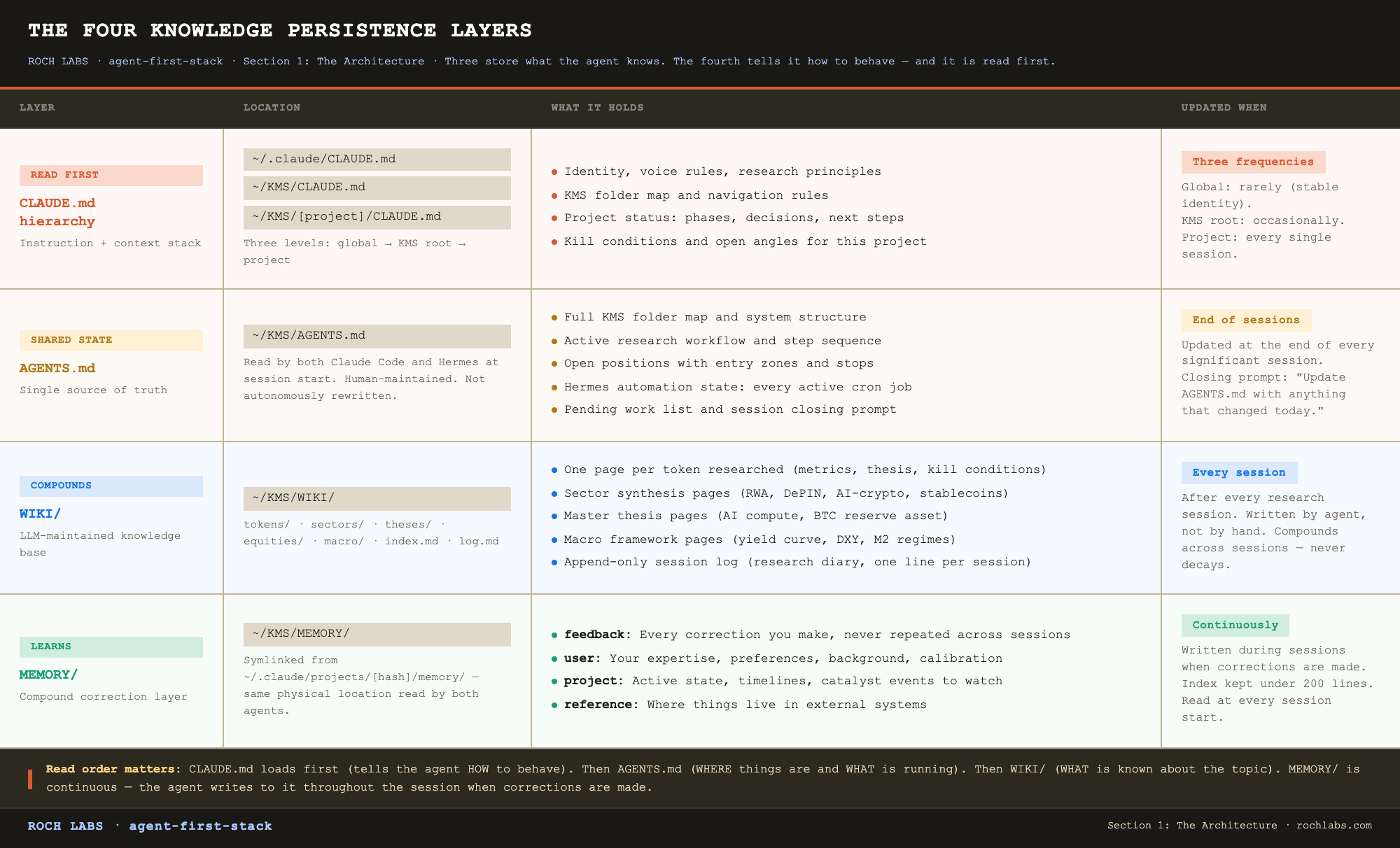
AGENTS.md is the single source of truth that both Claude Code and Hermes read. It is human-readable and human-maintained. When it is current, both agents are synchronized without any inter-agent communication.
WIKI/ is what makes this system different from a good note-taking habit. It is not written by you, it is maintained by the agent, updated after every research session, and queryable by every future session. By your tenth token research note, the wiki has ten cross-referenced pages. By your fiftieth, you have institutional memory that no individual session could hold.
MEMORY/ is the compound learning layer. When you correct the agent, wrong approach, wrong format, wrong assumption, that correction gets written to a memory file. Next session, the agent reads it before starting. It does not make the same mistake twice.
The rest of this article builds each of these layers from scratch.
Section 2: Claude Code
Claude Code is a local terminal agent with tool access, persistent context, and a configurable identity layer. It is not a chatbot. The distinction is operational, not semantic, and it changes what the tool is capable of at a fundamental level.
The chatbot vs. agent distinction
A chatbot takes a message and returns a response. That is the entire interaction model. Context resets every session. The AI has no access to your files, no ability to execute commands, no persistent state, no memory of what you told it last week, and no connection to live data. You bring everything to it. It gives you a response. You close the window and it forgets you exist.
Claude Code is architecturally different across every one of those dimensions:
- It runs in your terminal and has access to your file system
- It reads, writes, and edits files directly
- It executes shell commands
- It calls external tools (MCPs) to pull live market data, filings, and on-chain information
- It maintains a memory system that persists across sessions
- It reads your identity and behavioral rules from CLAUDE.md before every session
The practical result: open a Claude Code session inside a research project folder and the agent already knows who you are, what research workflow you follow, what project you are working on, what has been done so far, and what the next step is. It does not ask. It begins from that context.
That is not a better chatbot. It is a different tool.
Installation
Prerequisites: Node.js 18 or higher, npm.
# Install
npm install -g @anthropic-ai/claude-code

# Verify
claude --version

# First launch — will prompt for your Anthropic API key
claude
```
Your API key lives at console.anthropic.com. For most researchers starting out, the $20/month Pro plan is sufficient, it includes a generous token allowance and covers the interactive research sessions that Claude Code is used for. If you hit rate limits regularly or want direct control over model selection, switch to API billing.
Mac users: run from Terminal or iTerm2. VS Code integrated terminal also works. Avoid running Claude Code inside terminal multiplexers with unusual shell configurations on first setup, diagnose the base case first.
The CLAUDE.md system
This is the most important concept in the Claude Code setup. Everything else: MCPs, memory, skills, builds on top of it.
Every session you have ever had with a chatbot required you to re-establish context. Who you are, what you are researching, what format you want, what rules apply, what you covered last time. You did this every single session because the chatbot has no memory of you. The overhead compounds: 5 minutes of context-setting per session, 3 sessions per day, 5 days a week, that is 65 hours a year spent re-explaining yourself to a tool.
CLAUDE.md eliminates that overhead entirely. It is a plain text file that Claude Code reads at the start of every session. The agent arrives already briefed.
Two types, two scopes:
Global CLAUDE.md: `~/.claude/CLAUDE.md`
Applies to every Claude Code session regardless of which directory you open. This is your identity layer, who you are, what universal rules apply, how you work.
What belongs here:
```markdown
# Identity
[Your name, background, what you are building, your platforms and audiences]

# Voice rules
- No em dashes. Ever.
- Claim first, evidence second. Always.
- Source inline: "Per [source], [data]" — never footnotes.
- Specific numbers, ~ for approximations. Never "significant growth."
- Close in one line.

# Research principles
- Data hierarchy: on-chain first, fundamentals second, narrative third
- Conviction tiers: High / Medium / Speculative — publish with one, always
- Kill-my-thesis runs after wiki, before every draft. No exceptions.
- Wiki before draft. No exceptions.

# KMS structure
[Your full folder map — the agent needs to know where everything lives
to navigate your file system correctly]

# Workflow
[The step-by-step research protocol — so the agent follows the same
sequence every session without being reminded]
```
Keep the global CLAUDE.md stable. It contains what is universally true about you and your work. It is not a scratchpad for session notes or project state, that belongs in the project CLAUDE.md.
Project CLAUDE.md: `/KMS/[project-folder]/CLAUDE.md`
Created inside every project folder. Read when you open that project in Claude Code. Overrides global rules where they conflict. Contains everything that is specific to this project and this session.
What belongs here:
```markdown
# Project: Kaspa ($KAS) — CB Token Research
Last updated: 2026-05-28

## Status
| Phase | Status |
|---|---|
| Data collection | COMPLETE |
| CT sentiment (Grok) | COMPLETE — crowding MEDIUM, Kadena comp flagged |
| Wiki | COMPLETE v2 (Toccata sell-the-news risk addressed) |
| Kill-my-thesis | COMPLETE — PUBLISHABLE (v2 wiki) |
| Draft v1 | IN PROGRESS |
| Draft vX-final | PENDING |

## Angles
- Primary: Toccata activation as smart contract entry point, June 5-20 window
- Secondary: ASIC miner centralization — reframe as security feature not risk
- Kill condition: no measurable dev demand within 30 days of Toccata launch

## Key data points
- Price: $0.034, market cap $830M, FDV $1.2B (CMC, May 28)
- Kadena comparable: pumped 40% pre-launch, retraced 60% over 90 days post

## Prior CB coverage
- KAS note May 2025 — did not cross-post to X

## Next steps
1. Fix Toccata sell-the-news section in wiki v2
2. Rerun kill-my-thesis on wiki v2
3. Draft v1 from updated wiki
```
This document is what makes every project resumable in under 60 seconds. Open the folder, open Claude Code, the agent reads the CLAUDE.md, and it knows exactly where you left off. No recap. No re-briefing. The status table is the first thing updated at the start of every session and the last thing updated at the end.
Every project in KMS gets one of these. Token research, equity research, macro notes, builds, general research, all of them. This is not optional.
The memory system
The CLAUDE.md hierarchy covers what is true about you and your projects at session start. The memory system covers what the agent learns during sessions and needs to retain across them.
Physical location: `~/.claude/projects/[hashed-path]/memory/`. In a properly configured KMS setup, this is symlinked to `~/KMS/MEMORY/`, the same folder Hermes reads and writes. One physical location, two agents.
Four memory types:
user: Who you are, your expertise level, your background, your preferences. Informs how the agent calibrates explanations and recommendations. A CA-qualified researcher with institutional finance experience gets a different level of explanation than someone running their first research project.
feedback: This is the most important type. Every time you correct the agent, wrong approach, wrong format, wrong assumption, wrong model for a task, the agent writes that correction to a feedback memory file. Every future session reads those files before starting. The agent does not make the same mistake twice across sessions. This is what makes Claude Code behave differently from a chatbot even for identical prompts over time. The corrections compound. By the fiftieth session, the agent has internalized 50 sessions worth of corrections about how you specifically work.
project: Active project state, decisions made, timelines, catalyst events to watch. Used for things that change relatively quickly and need to be tracked across sessions without polluting the project CLAUDE.md.
reference: Where to find things in external systems. Which Linear project tracks pipeline bugs. Which Grafana board gets watched during incidents. Which Telegram channel carries position alerts.
Memory files use a standard frontmatter format:
```markdown
---
name: no-em-dashes
description: Rule 1 in writing-style-master.md. No em dashes in any content, any format.
metadata:
  type: feedback
---

Never use em dashes in any written content. Replace with a period, comma,
or colon. No exceptions across Discord notes, Substack essays, X posts,
or internal documents.

Why: Em dashes are explicitly prohibited in writing-style-master.md.
This was a recurring issue before the memory system was established.
How to apply: Before writing any content, scan for em dashes and eliminate.
```
The memory index file: `MEMORY.md`, is always loaded into the agent’s context at session start. It is a one-line-per-memory index pointing to the individual files. Keep it under 200 lines. If it grows beyond that, the index itself becomes a performance problem.
The skills system
Skills are Claude Code’s slash command layer. They are plain text markdown files that get injected into the agent’s context when invoked. Not code, documentation. You write what the agent should do when the command is called, and the agent follows it.
Invoked with a forward slash: `/coinbureau-research`, `/kill-my-thesis`, `/ct-sentiment-grok`.
Active skills in this stack:
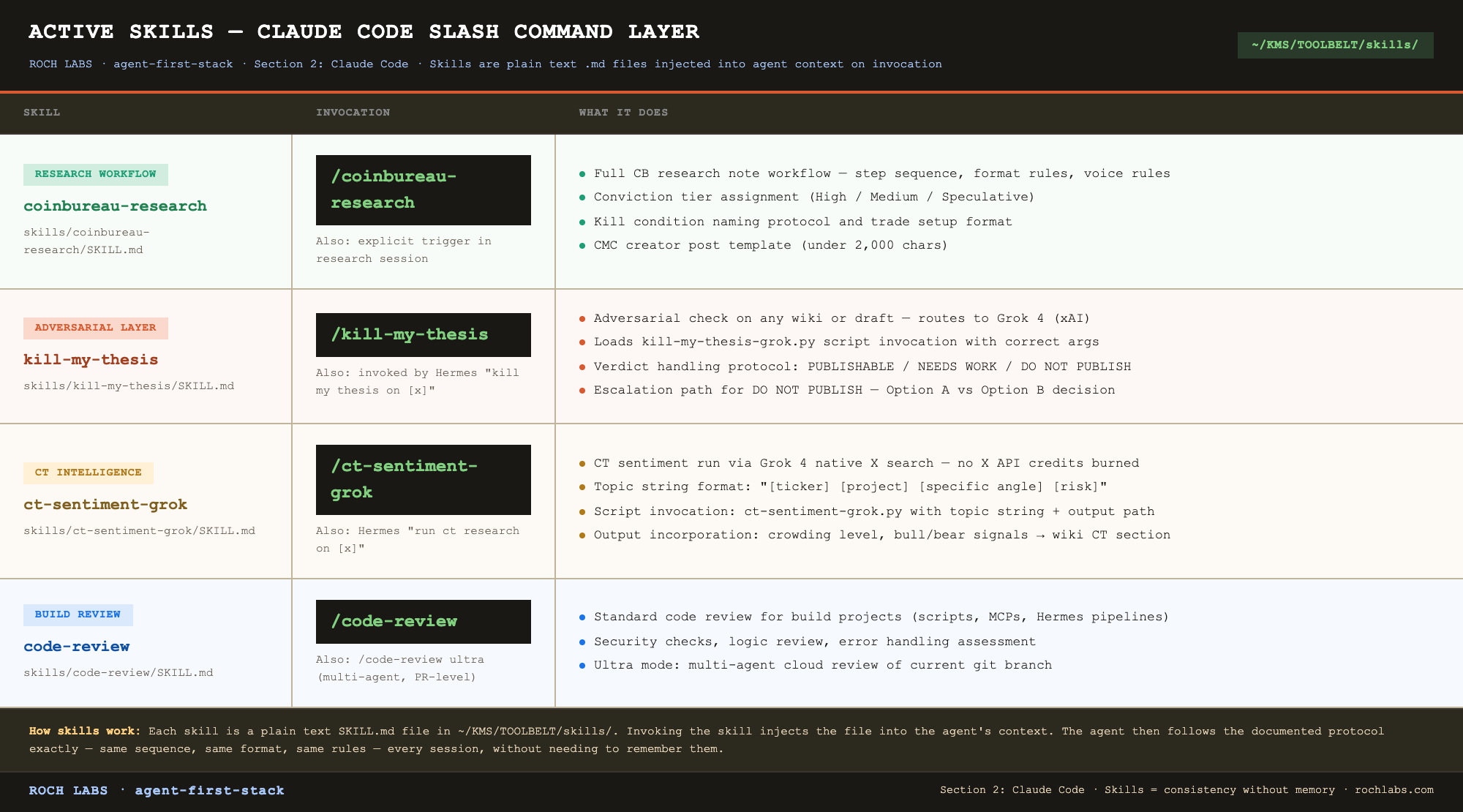
Skills live in `~/KMS/TOOLBELT/skills/`. Each skill is a folder containing a `SKILL.md` file and any reference materials the skill needs. The `SKILL.md` is what gets injected into context on invocation.
The value of the skills system is consistency across sessions. The kill-my-thesis protocol runs the same way every time because the skill file specifies exactly how it runs. The coinbureau-research skill ensures the format, conviction tier, and CMC post requirements are followed on every note without the agent needing to remember them from session to session.
Starting your first session
Once Claude Code is installed and your global CLAUDE.md is written, the first session is:
```bash
cd ~/KMS
claude
```
The agent reads `~/.claude/CLAUDE.md` (global identity and rules) and `~/KMS/CLAUDE.md` (KMS root context). It is now operating with your full context loaded.
For a specific project:
```bash
cd ~/KMS/COIN-BUREAU/token-research/kaspa
claude
```
Now it additionally reads the project CLAUDE.md and knows exactly what state this research is in.
The first thing to do in any new session: let the agent read the project CLAUDE.md and confirm its understanding of current status before doing anything. A single prompt: “what is the current state of this project and what is the next step?”, surfaces any drift between what is in the CLAUDE.md and what you remember from the last session. Fix the CLAUDE.md if there is drift. Then proceed.
Section 3: KMS: The Second Brain
Agents are stateless. Every session starts with no memory of the last one. The CLAUDE.md hierarchy and the memory system in Section 2 fix the agent’s behavior, they tell it who you are, how you work, and what rules apply. But behavior is not knowledge. The agent still needs somewhere to put the research itself, somewhere structured enough that future sessions can find it, query it, and build on top of it.
That is what the KMS solves. Not by improving the agent’s memory, but by making its knowledge environment persistent and structured. The agent operates inside a file system that is organized like a research institution rather than a downloads folder.
The core problem
Most researchers using AI today have their knowledge scattered across four locations that do not talk to each other:
Chat histories that are technically searchable but practically not
Browser bookmarks that get saved, never reviewed, and never categorized
Notes apps (Notion, Obsidian, Apple Notes) with no consistent project structure
Their own heads, which is not a system
The result: every research session starts from approximately zero context. Token X was researched in March. The wiki page on it does not exist because there was no wiki. The on-chain data that supported the thesis is buried in a ChatGPT conversation from week 7. The Tier 1 CT take that flagged the kill condition is in a screenshot somewhere on the desktop. The note got published, did well, and is now structurally inaccessible to your own future research.
Six months in, you have produced 40 research notes and the cumulative knowledge sitting in queryable form is roughly the same as what you started with. You are not compounding. You are re-deriving.
The KMS is the structural fix. One location. Consistent organization. LLM-maintained. Always current.
The Karpathy llm-wiki principle
The conceptual core of the KMS is borrowed from Karpathy’s notion of an llm-wiki: a knowledge base maintained by language models, not by humans. The human validates and edits. The LLM reads, writes, restructures, and queries.
The reason this matters: a wiki maintained by a human has the same problem as every notes app. It decays. You write the page on day one, update it twice, forget it exists by month two, and never look at it again. The wiki and the work drift apart.
A wiki maintained by the agent has the opposite property. After every research session, the agent updates the relevant pages, adds the new data, cites the new sources, links to the new note. The wiki and the work stay in sync because keeping them in sync is built into the workflow rather than left to discipline.
The compound effect is what makes this category-different from a good notes app. By the tenth token research note, the wiki has ten cross-referenced token pages. By the fiftieth, you have a knowledge base that contains competitive context, historical positions you have taken, theses that worked, theses that did not, and the patterns that distinguish the two. That is not something any chatbot can replicate and not something a manual notes practice produces at any volume.
The five top-level folders
The KMS sits at `~/KMS/` and has exactly five top-level folders. The structure is rigid by design, once the agent learns this layout, it navigates the file system without asking.
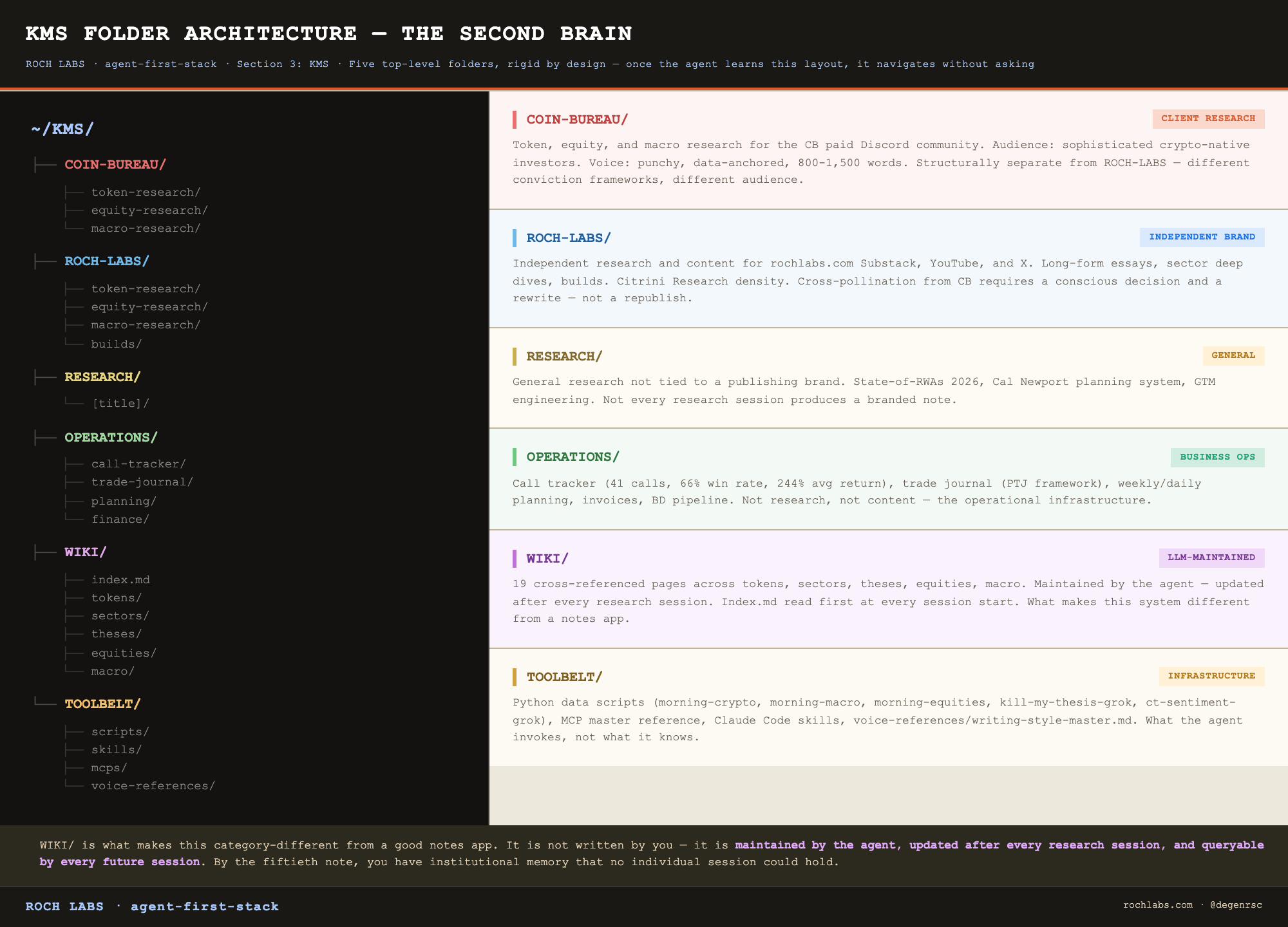
The brand separation between COIN-BUREAU/ and ROCH-LABS/ is not housekeeping. It is a structural rule. They are different audiences, different voices, different publishing channels, and different conviction frameworks. Research done for one does not automatically become content for the other. Cross-pollination requires a conscious decision, and that decision is easier to make consciously when the folders enforce the separation rather than blur it.
OPERATIONS/ holds the artifacts that are neither research nor content: the call tracker, the trade journal, the invoice templates, the BD pipeline, the X analytics. WIKI/ is covered in detail below. TOOLBELT/ holds the operational infrastructure, scripts, MCP references, skills, the voice master file.
The universal project structure
Every research project, regardless of brand, regardless of asset class, regardless of build type, uses an identical internal folder structure. This is the rule that pays the most compounding interest. Once the agent knows the structure, every project is navigable from the first second.
```
[project-name]/
├── CLAUDE.md                    ← project state, status, decisions, next steps
├── research/
│   ├── raw/                     ← source data: articles, transcripts, market data
│   ├── wiki/                    ← synthesized knowledge base (built before drafting)
│   └── outputs/                 ← all versioned drafts (v1.md, v2.md, v3-final.md)
└── process/
    ├── raw/                     ← AI workflow artifacts: terminal screenshots, MCP outputs
    └── research-process.md      ← AI workflow documentation: tools used, prompts fired
```
The CLAUDE.md at the project root is what Section 2 covers, the resumability document. Below it sit two parallel layers, and the distinction between them is the single most important structural choice in the entire KMS.
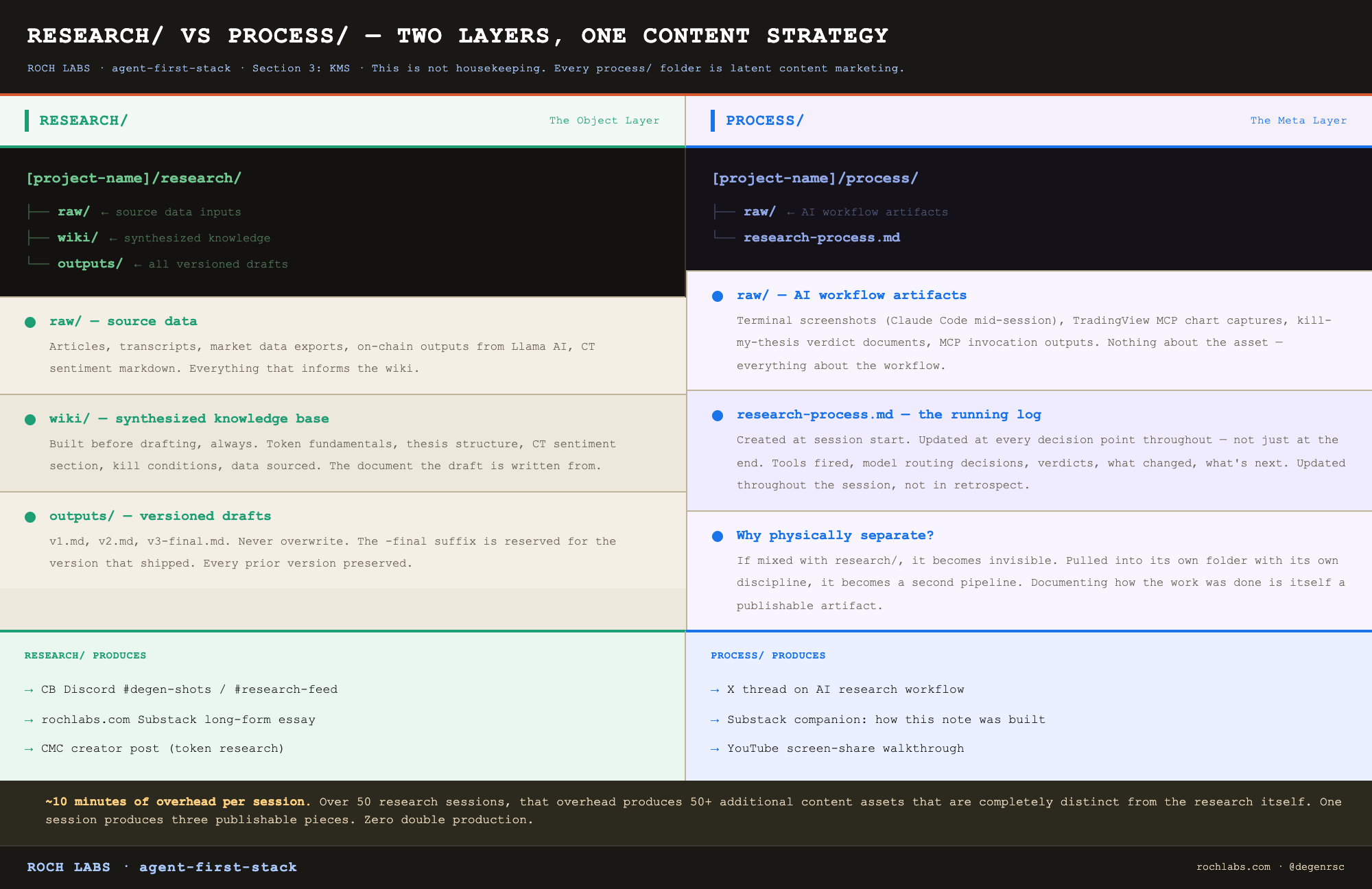
The research/ vs process/ separation
This is a content strategy, not housekeeping.
`research/` is the object layer. The actual work product. Source data in `raw/`, synthesized knowledge in `wiki/`, all versioned drafts in `outputs/`. Everything in here is about the asset being researched. A token wiki, an equity model, a macro framework. The output that gets published.
`process/` is the meta layer. How the AI was used to produce the work. Terminal screenshots showing Claude Code mid-session. MCP invocation outputs. Kill-my-thesis verdict documents. The sequence of tools fired, the model routing decisions made, and the verdicts at each step. None of this content is about the asset. All of it is about the workflow.
The reason these have to be physically separated: every `process/` folder is latent content marketing. Documenting how the work was done is itself a publishable artifact, and if it is mixed in with the work it becomes invisible. Pulled out into its own folder with its own discipline, it becomes a second pipeline.
One research session produces three publishable pieces:
1. The research note itself, the primary output, goes to CB Discord or Substack
2. The `research-process.md` documentation, the how-I-researched-this piece, potential Substack essay or YouTube walkthrough
3. The `process/raw/` screenshots, the AI workflow in action, potential X thread
Pieces 2 and 3 cost approximately 10 minutes of overhead per session once the documentation habit is built. Over a year, that overhead produces 50+ secondary content assets that are completely distinct from the research itself. This is what the process/ layer makes structurally possible.
Version control discipline
Inside `research/outputs/`, no draft is ever overwritten. One file per version. Always.
```
research/outputs/
├── kaspa-v1.md            ← first draft: structure and data
├── kaspa-v2.md            ← voice calibration applied
├── kaspa-v3.md            ← bear case sharpened, kill conditions named
└── kaspa-v3-final.md      ← approved, published
```
The `-final` suffix is reserved. It means the article shipped. Anything without it is still draft, regardless of how polished it looks. This is a small discipline that solves a recurring problem: knowing which version is the source of truth six weeks after publication. You go back to the folder, find the `-final` file, and that is the canonical version. Every prior version is preserved for reference, comparison, and the occasional retrospective post.
The same rule applies to wikis. `kaspa-fundamentals-v1.md`, `kaspa-fundamentals-v2.md`. The kill-my-thesis layer in Section 6 frequently sends a wiki back for revisions, and preserving the v1 wiki alongside the corrected v2 is what makes the adversarial process auditable. You can read v1, read the verdict, read v2, and see exactly what changed.
The WIKI/ system
The WIKI/ folder at `~/KMS/WIKI/` is the second brain proper. It is the LLM-maintained, cross-session knowledge base, the artifact that makes 50 research sessions accumulate into something queryable.
Structure:
```
WIKI/
├── index.md          ← master index, read first before every research session
├── log.md            ← append-only session log
├── theses/           ← master thesis pages (AI compute scarcity, BTC reserve asset, etc.)
├── tokens/           ← one page per token researched
├── sectors/          ← sector synthesis pages (RWA, DePIN, stablecoins, AI-crypto)
├── equities/         ← equity research pages (VRT, ORCL, etc.)
└── macro/            ← macro framework pages (yield curve, M2, DXY regimes)
```
The `index.md` is the entry point for every research session. Before the agent starts new work, it reads the index to check whether the topic has already been researched. A new note on Kaspa does not start from zero, it starts from whatever the existing `tokens/kas.md` page contains. A new RWA sector piece reads `sectors/rwa.md` first.
A token wiki page contains everything the agent needs to write or update a note without redoing the data collection:
```markdown
# Kaspa ($KAS) — Wiki

## Thesis
[2-3 sentence structural thesis]

## Key Metrics (as of [date])
| Metric | Value | Source |
|---|---|---|
| Price | $0.034 | CMC |
| Market cap | $830M | CMC |
| FDV | $1.2B | CMC |
| 30D price change | +18% | CMC |

## Protocol Fundamentals
[TVL, on-chain activity, competitive positioning, mining economics]

## Toccata Activation — The Catalyst
[What it is, timeline, mechanism, comparable precedents]

## CT Sentiment (Grok x_search, [date])
- Crowding: MEDIUM
- Bull signal: [top signal]
- Bear signal: [top bear take]

## Kill Conditions
1. [Specific measurable condition that breaks the thesis]
2. [Second condition]
3. [Third condition]

## Prior Coverage
[Links or references to published notes on this token]
```
The index entry for this same token is one line:
```
- [KAS](tokens/kas.md) — Smart contract activation (Toccata) thesis. MED conviction. Entry $0.034. Last updated 2026-05-28.
```
The index is one line per wiki page, sorted by category. The agent reads it in under a second. It is the table of contents for everything you have ever researched.
Initializing the WIKI is two commands:
```bash
mkdir -p ~/KMS/WIKI/{theses,tokens,sectors,equities,macro}
touch ~/KMS/WIKI/index.md ~/KMS/WIKI/log.md
```
The `log.md` is append-only. After every research session, the agent adds a one-line entry:
```
## [2026-05-28] research | $KAS — Toccata activation thesis; kill-my-thesis flagged Kadena sell-the-news comp, wiki v2 PUBLISHABLE
```
The log is the chronological record of every session. The index is the topical record. Together they give you both axes, what was researched when, and what is the current state of knowledge on any topic. By the hundredth session, the log is the most honest research diary you have ever kept, because it was generated as a byproduct of the work rather than as a separate journaling discipline.
AGENTS.md: the single source of truth
One file at `~/KMS/AGENTS.md` that both Claude Code and Hermes read. It contains the full operational state of the system: your identity, the KMS folder map, the active research workflow, the MCP stack with their gotchas, your current open positions with entry zones, the Hermes automation state including every active cron job, and the pending work list.
The discipline is updating it at the end of every significant session. The closing prompt is built into the system: ”Update AGENTS.md with anything that changed today so both agents stay in sync.”
This file is what makes the two-agent architecture work without any inter-agent communication. Claude Code does not message Hermes. Hermes does not message Claude Code. Both of them read AGENTS.md at session start and operate from the same shared state. When AGENTS.md is current, both agents are synchronized. When it drifts, both agents drift in the same direction, which is still better than drifting in different directions.
AGENTS.md is human-readable and human-maintained. The agents read it but neither agent rewrites it autonomously. This is intentional. The single source of truth needs to be auditable, and the only way to keep it auditable is to keep it under your hand.
TOOLBELT/: the operations layer
The last top-level folder is the one that holds the moving parts of the system rather than the knowledge it produces:
```
TOOLBELT/
├── voice-references/
│   ├── writing-style-master.md    ← always read before writing the final draft
│   └── note-template.md           ← scaffold for new research notes
├── mcps/
│   ├── mcps-master.md             ← every MCP with cost, gotchas, call examples
│   └── tradingview-mcp/           ← the most finicky MCP gets its own folder
├── scripts/                       ← Python data collection scripts
│   ├── morning-crypto.py
│   ├── morning-equities.py
│   ├── morning-macro.py
│   ├── kill-my-thesis-grok.py
│   └── ct-sentiment-grok.py
└── skills/                        ← Claude Code skill files
    ├── coinbureau-research/
    ├── kill-my-thesis/
    └── ct-sentiment-grok/
```
The TOOLBELT is what the agent invokes during a session. The scripts are the cost-efficient data collection layer covered in Section 5. The MCP master file is the reference the agent reads before calling any external tool. The skills are the slash command layer. The voice references are read before final drafts.
Putting all of this under a single TOOLBELT folder, separated from research output, means the agent has one place to look for “how do I do this” and another place to look for “what do I know about this.” Mixing the two, putting voice rules inside a research folder, or putting scripts inside an OPERATIONS folder, produces the kind of structural ambiguity that the entire KMS exists to eliminate.
What the structure delivers
Run this system for three months and the second brain stops being a folder hierarchy and starts being infrastructure. New sessions open inside a project and the agent already knows the wiki state, the prior coverage, the open kill conditions, and the next step. New tokens get researched against ten existing wiki pages rather than from a blank context. New theses get drafted on top of a knowledge base that grows after every session rather than disappears after every chat.
The agent is stateless. The environment is not. That is the trade the KMS makes, and it is the trade that turns AI from a tab in your browser into the operating layer of a research operation.
Section 4 covers the second agent: Hermes, that runs in this same environment without human initiation. If you are not ready for a VPS, skip ahead to Section 5: the MCP stack is what gives this knowledge environment its connection to live markets, and it works on Claude Code alone.
Section 4: Hermes: The Automation Layer
A note before you start reading this section. Sections 2, 3, 5, 6, and 7 of this article cover a fully functional research system. Claude Code, the KMS second brain, the MCP stack, the multi-LLM routing, and the eight-step research workflow all run without Hermes. If you are not ready to set up a VPS or run a background daemon, skip this section entirely on your first pass. The system described in the rest of the article works on a Mac alone. Hermes is Phase 2. Come back here when the manual workflow is clean and you have something worth automating.
The reason that callout matters: automating a research process before you have run it manually for a few weeks produces faster confusion, not faster output. The right build sequence is to feel the cost of doing each step by hand, and only then to automate the steps where the cost is structural rather than situational. Most readers who try to set up Hermes on day one quit during the VPS configuration, and they quit having learned nothing about research itself. There is no rush.
The thesis
Claude Code requires a human to start it. Hermes does not.
That is the only distinction that matters operationally, and it is the entire difference between a tool and an agent. Everything else in this section is implementation detail that follows from that one sentence.
Claude Code is interactive. You open a terminal, you type `claude`, the session starts. The agent is capable and present, but it is also waiting. Without you, it does nothing. Most AI products sit in this category, including every chatbot, every IDE assistant, and every research copilot that bills itself as an agent but only runs when you click the button.
Hermes is autonomous. It runs as a daemon on a server. It listens for scheduled triggers and Telegram commands. It executes pipelines without anyone opening a terminal. At 6:30 AM IST it pulls macro data, crypto prices, CT sentiment, and a Gemini synthesis, and the brief lands on your phone before you have brewed coffee. At 7:00 PM IST it checks open positions against live prices and sends the result. None of that requires you to be at your laptop. None of it requires you to remember to run anything.
The shift from interactive to autonomous is what changes the operation from a tool you use into a system that runs.
What Hermes actually is
Hermes is an autonomous agent that runs as a daemon. It can run on a VPS, on a local machine left on overnight, or as a scheduled service. It has three trigger types: cron schedules, Telegram commands sent by you, and event triggers from other pipelines.
In this stack, the division of labor is clean. Hermes handles everything on a schedule or triggered by an event. Claude Code handles everything that requires decision-making alongside a human. There is almost no overlap. Hermes does not draft research notes. Claude Code does not run morning briefs.
The interface is Telegram. Not a web dashboard, not an email client, not a CLI you log into. Every output Hermes produces is delivered to a Telegram chat. Every command you give Hermes is typed into the same chat. This sounds primitive and it is the right primitive: it works on your phone, it works from anywhere, it has a chronological log built in, and it costs nothing to operate.
Installation
```bash
# Install
npm install -g hermes-agent

# Initialize inside the KMS root
cd ~/KMS
hermes init
```
The init command creates the Hermes home directory and the configuration files that govern the agent:
```
~/.hermes/
├── config.yaml      ← daemon configuration, model defaults, schedule registry
├── .env             ← API keys (per-key environment variables)
├── auth.json        ← multi-provider key vault (covered below)
└── skills/          ← Hermes-side skill files, parallel to Claude Code skills
```
Launching Hermes is always from the KMS root:
```bash
cd ~/KMS && hermes
```
The reason for that pattern: Hermes reads AGENTS.md and the KMS folder map at startup. It needs to be launched from a location where the relative paths in AGENTS.md resolve correctly. Launching from elsewhere works but produces confusing errors when a cron job tries to read or write a file at a path that does not exist relative to the working directory.
Telegram bot setup
Hermes has no interface except Telegram, so the bot is not optional. Setting it up is two steps in the Telegram app and one configuration line.
In Telegram, message @BotFather and create a new bot. You get a bot token. Message @userinfobot and you get your chat ID. Drop both into ‘~/.hermes/.env’:
```bash
TELEGRAM_BOT_TOKEN=your_bot_token_here
TELEGRAM_CHAT_ID=your_chat_id_here
```
After that, every cron job, every alert, every status update, every delegated pipeline output lands in that chat. Pin the chat. It becomes your operational dashboard.
API key management: auth.json
This is the configuration detail that goes wrong most often, so it gets explained carefully.
Hermes runs multiple LLMs. Grok 4 for CT sentiment and kill-my-thesis. Gemini 2.5 Flash for the data workers. Gemini 2.5 Pro for morning brief synthesis. Claude Sonnet 4.6 for delegated execution via `claude -p`. Three providers, multiple keys per provider, sometimes a need to rotate keys when one is throttled.
The `auth.json` file at `~/.hermes/auth.json` is the central key vault. It holds a pool of keys for each provider with a simple active/inactive flag:
```json
{
  "xai-oauth": [
    {"key": "xai-...", "active": true},
    {"key": "xai-backup-...", "active": false}
  ],
  "google": [{"key": "AIza...", "active": true}],
  "anthropic": [{"key": "sk-ant-...", "active": true}]
}
```
When a Hermes pipeline needs a key, it follows a three-way fallback in this exact order:
1. Check the environment variable (e.g., `XAI_API_KEY` if running in a shell that exported it)
2. Check `~/.hermes/.env` for the same variable
3. Parse `auth.json` and pull the first key marked `active: true` for the provider
The reason this fallback exists is one sentence of technical detail: terminal commands spawned by Hermes run in fresh shells that do not inherit the Python environment of the parent process, so environment variables exported in your shell config are invisible to those spawned commands. Without the `auth.json` fallback, half the pipelines work in interactive testing and silently fail at 6:30 AM when the cron fires in a shell that has none of your exports. The fallback is what makes the system work in production rather than only when you are watching it.
Practical rule: put every API key in `auth.json` at setup time. Treat the environment variable and `.env` paths as conveniences for local testing, not as the source of truth. The source of truth is ‘auth.json’.
The three active cron jobs
Three scheduled pipelines run in this stack as of May 2026. They are what Phase 2 actually does on a day-to-day basis.
**========== 📷 INSERT IMAGE HERE → png-visuals/visual-08-morning-brief-pipeline.png ==========**
Creating a cron job is one command:
```bash
hermes cron create \
  --schedule "30 6 * * * IST" \
  --command "morning-brief" \
  --name "Morning Brief"
```
The schedule string follows standard cron syntax with an explicit timezone suffix. The command references a registered skill in `~/.hermes/skills/`. The name is what shows up in the Telegram status replies when you ask Hermes what is scheduled.
Listing the active schedule from anywhere:
```bash
hermes cron list
```
Three jobs is the right number. Each one has a clear purpose and a measurable output. Adding a fourth job needs justification beyond “it would be nice to have.” Most readers will start with just the morning brief, run it for a month, and add the evening alert once the brief is working reliably. That is the right pace.
The Claude Code delegation pattern
Hermes is the orchestrator. Claude Code is the executor. The pattern that makes the two-agent architecture work is Hermes calling Claude Code as a subprocess for tasks that require structured file editing.
The canonical invocation:
```bash
claude -p "Update ~/KMS/WIKI/tokens/[token].md with [new data block]" \
  --allowedTools Read,Edit,Write \
  --model claude-sonnet-4-6 \
  --dangerously-skip-permissions
```
What this does: Hermes spawns a non-interactive Claude Code session, hands it a specific prompt, restricts it to the read/edit/write tool set, pins it to Sonnet 4.6 for cost, and skips the interactive permission prompts that would otherwise block the daemon. The Claude Code session runs to completion, writes the file, and exits. Hermes pipes the result to Telegram.
This is Phase 2 in operation. The morning brief uses this pattern for the wiki update phase: Hermes produces the synthesized brief, then delegates the wiki update to Claude Code with the brief content as input. The wiki page is updated by Claude Code while Hermes coordinates the pipeline around it.
The reason this delegation pattern is structurally important rather than a convenience: Hermes is good at scheduling, orchestration, and routine pipelines. It is not as good at structured file edits across a knowledge base. Claude Code is. Asking each agent to do what it is best at, and letting them communicate through the file system rather than through an API, is the design choice that keeps both agents simple. Neither one is asked to be a complete system on its own.
What Hermes cannot do
Two tools in the stack are Mac-only and cannot run inside a Hermes daemon on a Linux VPS:
- TradingView MCP. Requires the Mac desktop application launched in remote-debug mode. Cannot run headless. Cannot run on Linux.
- Llama AI (DefiLlama AI). Browser-based product. Requires an authenticated Mac browser session and the user signed in. Browser automation through Hermes is on the Phase 3 roadmap but not live yet.
Both of these run inside interactive Claude Code sessions on your Mac, when you are sitting at the machine. Hermes handles everything else.
This is not a limitation of the architecture. It is a deliberate split. The chart analysis and the deep on-chain pulls are exactly the steps where you want to be present and looking at the screen anyway. Automating them would deliver no leverage. Automating the morning brief, the position alerts, and the wiki updates is where the leverage actually lives, and that is what Hermes is configured to do.
VPS vs local
The question every reader at this point: do I need a VPS?
Running Hermes on a VPS gives you 24/7 availability independent of whether your laptop is on, asleep, or in another country. Minimum specification: 2 vCPU, 4GB RAM, Ubuntu 22.04 LTS. Hetzner CX22 at €4.50/month (about $6 USD) or DigitalOcean Basic at $12/month. Both are sufficient for the full Hermes workload, including the morning brief pipeline.
The alternative is running Hermes locally on your Mac. Same software, same configuration, same `auth.json`. The only difference: when your Mac is off or asleep, Hermes is not running. Cron jobs scheduled during those windows do not fire. For a researcher who keeps their machine on overnight and is fine missing a morning brief during travel, this is acceptable. For anyone who travels frequently or wants the system to be reliable independent of personal habits, the VPS is the right answer.
The right path for most readers: run Hermes locally for the first month while you stabilize the cron jobs and confirm the pipelines work. Move to a VPS once the system is producing daily output you depend on. The migration itself is straightforward: provision the VPS, copy `~/.hermes/` and the KMS folder, install the Node and Python dependencies, restart the daemon. An afternoon of work, once.
What this gives you
Three cron jobs, one Telegram chat, one daemon running on a $6/month server. The Morning Brief lands at 6:30 AM IST every day. The Evening Position Alert lands at 7:00 PM. The wiki updates itself after every brief without you opening a terminal. The system runs.
The leverage Hermes adds is not faster research. It is research that happens while you are doing other things. The hours you previously spent reading overnight headlines, pulling macro data, checking open positions, and updating the wiki are now hours where the output is already on your phone when you wake up. The agent did the work. You walk in at 7:00 AM and read the brief.
That is the practical end of Phase 2. The system runs without you. You are the editor.
Section 5 covers the data layer that feeds both agents: the eight MCPs, the Python scripts that batch the most expensive calls, and the cost discipline that keeps the whole stack at sub-$250 per month.
Section 5: MCP Stack: The Data Layer
You are about to set up eight data tools and then learn why you should not use most of them for routine data calls. That is not a contradiction. It is the architecture.
MCPs (Model Context Protocol tools) are the mechanism by which an AI agent accesses live data. Without them, Claude Code reasons from its training cutoff: August 2025 for Claude Sonnet 4.6. With them, it has real-time access to crypto prices, equity filings, macro indicators, on-chain data, and live chart analysis. The MCP stack is built for coverage: you configure all eight so that when you need something specific, the tool is already wired in and the agent knows how to call it. But for the daily data collection that runs in every research session, prices, rates, dominance, Fear & Greed, pre-built Python scripts batch those calls into single executions that are faster, cheaper, and more reliable than firing individual MCP calls one by one. The MCPs handle depth and specificity. The scripts handle routine breadth.
That distinction governs how the entire data layer is used.
What MCPs are
MCPs are standardized tool servers. Claude Code connects to them at session start and can call their functions as native tool use, the same way it calls Read or Edit on a local file, except the data comes from an external source. The agent knows the tool’s schema, can pass parameters, and parses the response directly into context.
Configuration lives in `~/.claude/settings.json`. Every MCP registered there is available to Claude Code for any working directory:
```json
{
  "mcpServers": {
    "coinmarketcap": {
      "command": "npx",
      "args": ["@coinmarketcap/mcp"]
    },
    "fred": {
      "command": "npx",
      "args": ["@federal-reserve/fred-mcp"]
    }
  }
}
```
Each entry tells Claude Code how to start the MCP server process. The agent handles the rest, connection, authentication via the key in `.env`, schema discovery, and tool routing.
The active stack
Eight MCPs cover the full data surface of a crypto and macro research operation. The table below is the reference for what each one does, what it costs, and where it goes wrong.
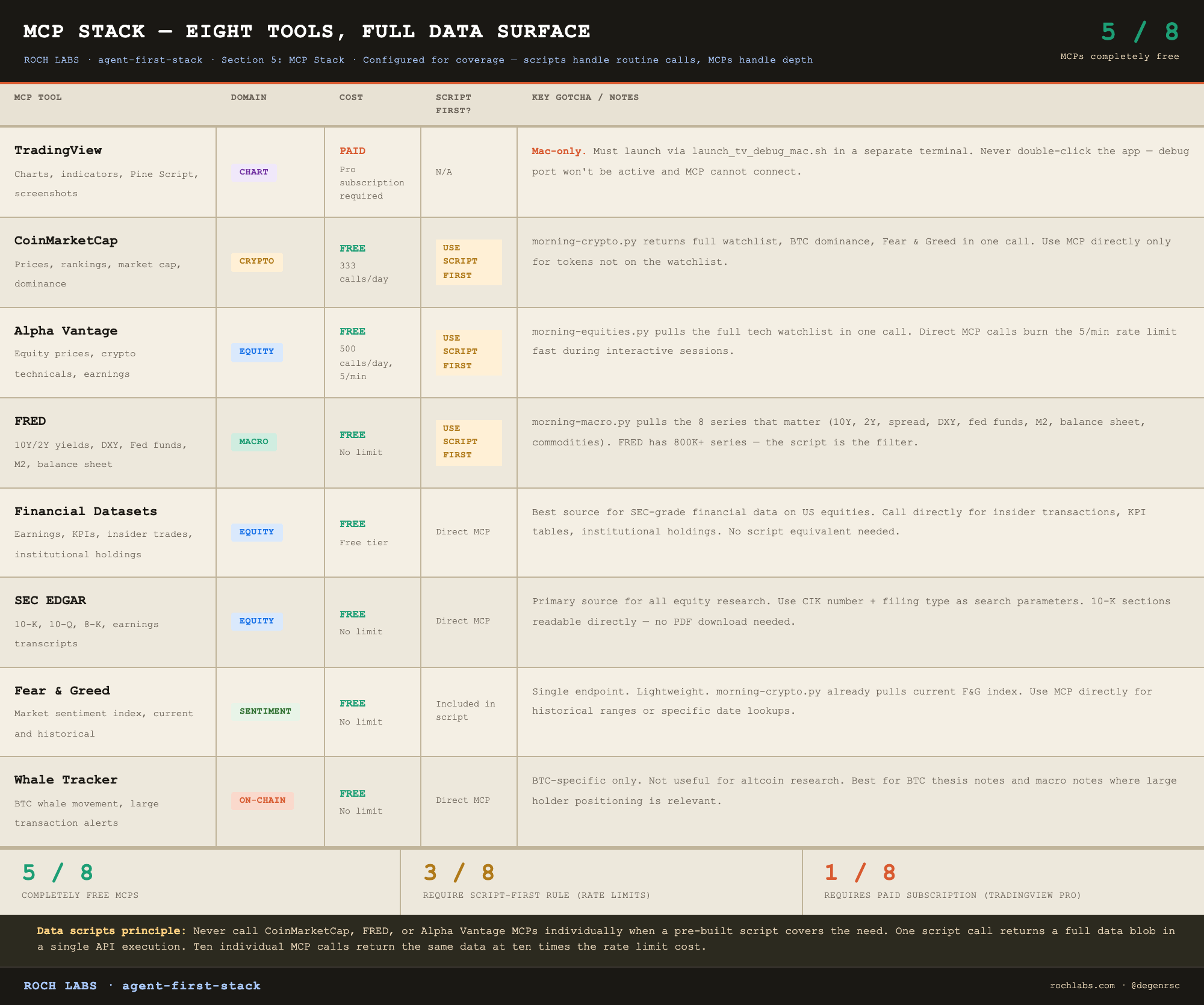
Five of the eight are completely free. The three with usage limits (CMC, Alpha Vantage, FRED) all have pre-built scripts that batch their most common calls into single executions. The only MCP in the stack that requires a paid subscription outside normal API costs is TradingView, and that cost is the Pro plan for the desktop app, not the MCP itself.
The data scripts principle
This is the single most important operational rule in the data layer. Read it once and apply it without exception.
Never call the CoinMarketCap, FRED, or Alpha Vantage MCPs individually when a pre-built script covers the need. One script call returns a full data blob in a single API execution. Ten individual MCP calls return the same data at ten times the rate limit cost.
Three scripts cover the routine data collection for every research session:
```bash
# Crypto: full watchlist prices, BTC dominance, Fear & Greed index, top 24h movers
python3 ~/KMS/TOOLBELT/scripts/morning-crypto.py

# Macro: FRED rates (10Y, 2Y, DXY, Fed funds, M2, balance sheet), yield curve spread, commodities
python3 ~/KMS/TOOLBELT/scripts/morning-macro.py

# Equities: watchlist quotes, top tech movers (NVDA, AMD, MSFT, GOOGL, META)
python3 ~/KMS/TOOLBELT/scripts/morning-equities.py
```
Each script returns a structured JSON blob saved directly to `research/raw/`. The agent reads it, parses it, and proceeds to the next step. Total execution time for all three: under 90 seconds.
Call MCPs directly only for what the scripts do not cover:
- SEC EDGAR: specific filings by CIK or ticker
- Financial Datasets: insider transactions, KPI tables, institutional holdings
Everything else runs through the scripts.
One practical note for pre-listed tokens, tokens not yet on CoinMarketCap or trading only on a single DEX. The morning-crypto.py script has a `DEX_OVERRIDES` dictionary for exactly this case. Add the token address and the GeckoTerminal pool URL, and the script pulls the price from the pool directly rather than CMC. This is how tokens like $POD were tracked before their CMC listing.
TradingView MCP: setup and capabilities
TradingView MCP is the most capable tool in the stack and the most specific to configure. It controls a live TradingView Desktop instance via remote automation, not a web scraper, not an API, but direct automation of the running application.
The single most common mistake: launching TradingView by double-clicking the app. That opens TradingView without the remote debug port active. The MCP cannot connect to a standard TradingView session. It needs to be launched via the debug script every time:
```bash
~/KMS/TOOLBELT/mcps/tradingview-mcp/scripts/launch_tv_debug_mac.sh
```
Run this in a separate terminal before starting Claude Code. TradingView opens with the debug port active. Claude Code connects through the MCP. From that point, the agent can control the chart directly.
Capabilities once connected:
```
chart_set_symbol       → switch to any ticker (BTC/USDT, AAPL, DXY)
chart_set_timeframe    → 1m, 5m, 1h, 4h, 1D, 1W, 1M
chart_manage_indicator → add, remove, configure indicators by full name
data_get_study_values  → pull current numeric values from any visible indicator
data_get_ohlcv         → pull price bars with summary=true for a compressed view
capture_screenshot     → save chart screenshot to process/raw/
alert_create           → set a price alert from the agent
pine_set_source        → inject Pine Script code
pine_smart_compile     → compile and check errors
```
A typical chart analysis sequence for a token research session:
```
chart_set_symbol → "KASUSDT" on Binance
chart_set_timeframe → "1W"
chart_manage_indicator → add "Volume Profile Fixed Range"
chart_manage_indicator → add "Relative Strength Index"
data_get_study_values → pull RSI value and volume profile levels
capture_screenshot → region: "chart", save to kaspa/process/raw/tv-weekly-2026-05-28.png
```
The screenshot saves to `process/raw/`, the AI workflow folder, not the research data folder. Chart analysis screenshots are AI workflow artifacts. The data they contain (key levels, RSI reading, volume nodes) gets written into the wiki. The image itself is process documentation.
**For Linux and Windows users:** TradingView MCP is not available outside Mac. For chart analysis, the TradingView web platform covers basic needs. Alpha Vantage via the morning-equities.py script provides technical indicator data programmatically. The rest of the stack, all seven other MCPs, work on any platform.
MCP installation: general pattern
Most MCPs in this stack are npm packages with a standard registration pattern. The exact package name varies by MCP, check the documentation for each one, but the structure is consistent:
```bash
# Install the MCP package globally
npm install -g @provider/mcp-package-name

# Or run without installing via npx (simpler, slightly slower at first call)
# No install step needed — add directly to settings.json

# Register in ~/.claude/settings.json
{
  "mcpServers": {
    "provider-name": {
      "command": "npx",
      "args": ["@provider/mcp-package-name"],
      "env": {
        "API_KEY": "your-key-here"
      }
    }
  }
}
```
API keys go in the `env` block of the settings entry, or in a `.env` file that the MCP process reads at startup. Check each MCP’s documentation for which pattern it expects.
Before invoking any MCP in a research session, read `~/KMS/TOOLBELT/mcps/mcps-master.md`. It documents every active MCP with its exact call syntax, rate limits, common errors, and the workarounds that have been found in production. The gotcha column in the table above is the summary. The master file is the detail.
What the data layer gives you
Eight tools covering the full surface of a professional research operation. Real-time crypto markets. SEC filings from the last 24 hours. Macro data updated as FRED publishes it. Live chart analysis with indicator values pulled directly into the agent’s context. Pre-listed token prices handled via GeckoTerminal through the DEX_OVERRIDES dictionary in morning-crypto.py.
The agent does not browse. It calls structured tools and receives structured data. That data goes directly into `research/raw/`, feeds the wiki build, informs the kill-my-thesis adversarial check, and ultimately shows up as sourced claims in the published note.
Section 6 covers the intelligence layer that processes this data, the four-model pipeline where each model is assigned the task it is structurally best suited for.
Section 6: Multi-LLM Architecture
Using one model for everything optimizes for convenience. Routing tasks to the model structurally best suited for each one optimizes for output quality. The difference between the two approaches does not show up on benchmark leaderboards. It shows up in win rate.
This section covers the four-model stack, the routing logic that assigns each task to the right model, and the one structural argument that determines the entire architecture: the model that builds the wiki cannot be the model that adversarially checks the wiki, because they are the same model.
That argument is the philosophical core of this entire article. Everything else in the stack is configuration. This is the part that has to be reasoned about.
Why task-model matching matters
Consider the tasks inside a single research note. The agent needs to search X for CT sentiment, find Tier 1 takes, and assess crowding. It needs to compress raw data from 12 sources into a 2,000-word structured wiki. It needs to stress-test the resulting thesis for structural flaws, missing data, and unstated assumptions. It needs to write the final 1,500-word note in a consistent voice with no em dashes, every claim sourced, and the bear case named.
These four tasks have different capability requirements. The model with native X search access is not the model with the strongest knowledge compression. The model that writes well is not the model that argues most rigorously against its own output. The model with the best cost-to-quality ratio for routine work is not the model you want running the once-a-day synthesis where compression quality compounds across the entire brief.
Routing all four tasks to the same model is the default behavior of every chatbot-style AI product. It is also the source of the most common failure mode in AI research: the agent that is fine at everything and excellent at nothing, producing notes that read like they were generated rather than reasoned through.
The fix is not finding a better single model. The fix is treating model selection as routing.
The independence problem
One of the four tasks above carries a requirement that the other three do not. The adversarial layer (kill-my-thesis) must be structurally independent from the synthesis layer (wiki building). If it is not, the entire adversarial step is performative rather than functional.
Here is the failure mode in concrete form. Claude Opus 4.7 builds the wiki. The wiki contains the thesis, the data, the bull case, the kill conditions. You then ask Claude Opus 4.8 to act as a hostile counterparty and tear the wiki apart. Opus 4.8 reads the wiki, identifies some surface flaws, returns a verdict, and you proceed to draft.
The problem is that Opus 4.8 and Opus 4.7 are the same model family. Same training corpus. Same RLHF process. Same embedded priors about what counts as a strong argument, what counts as a weak one, and what counts as a reasonable extrapolation from incomplete data. When the synthesis model writes “the catalyst is structurally bullish because of X, Y, and Z,” the adversarial model from the same family is predisposed to find X, Y, and Z reasonable. It was trained to. It will catch typos and obvious gaps. It will miss the assumptions that the entire family was conditioned to make.
That is not independence. It is a model reviewing itself with a slightly different temperature setting.
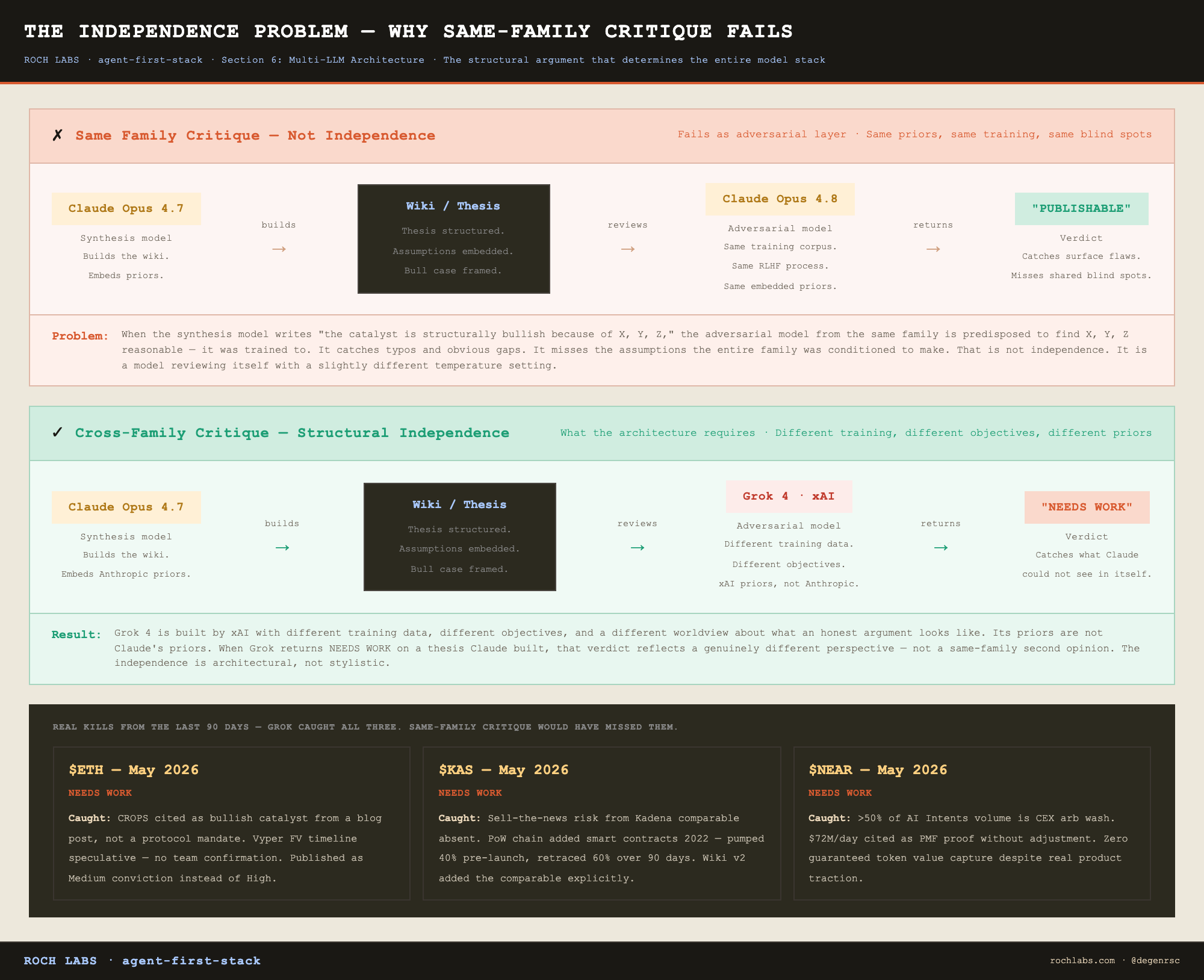
Grok 4 is built by xAI. It was trained on different data with different objectives by a different team with a different worldview about what an honest argument looks like. Its priors are not Claude’s priors. When Grok returns a NEEDS WORK verdict on a thesis Claude built, that verdict reflects a genuinely different perspective rather than a same-family second opinion. The independence is architectural, not stylistic.
This is the argument that determines the entire model stack. The synthesis layer uses Claude. The adversarial layer cannot use Claude. The two layers have to be from different model families or the integrity of the adversarial step collapses.
The five-model stack
Grok 4 (xAI). Role: CT/X sentiment and adversarial kill-my-thesis.
Grok has two roles in this stack and both depend on the same property: it is outside the Claude family.
For CT sentiment, the additional reason is functional. Grok has native X search. Claude does not. If you want overnight X chatter on a token, the Tier 1 accounts that have weighed in, the crowding level, and the bull/bear takes that are circulating, Grok is the only model that can pull that data directly. Every other model in the stack would need a web search wrapper that returns lower-fidelity results.
When CT sentiment runs: before building the wiki for any token, equity, or macro note. After raw data collection, before synthesis. Always.
```bash
python3 ~/KMS/TOOLBELT/scripts/ct-sentiment-grok.py \
  'KAS Kaspa Toccata smart contracts' \
  'kaspa/research/raw/ct-sentiment-grok.md'
```
The topic string matters. “KAS Kaspa” is not enough. “KAS Kaspa Toccata smart contract activation sell-the-news risk” gives Grok the search angle and produces a meaningfully sharper output. Be specific.
A typical Grok CT output (abbreviated, with handles redacted):
```
## CT Sentiment, $KAS (Kaspa)
Date: 2026-05-28
Crowding level: MEDIUM

Bull signals:
- Toccata activation expected June 5 to 20 window. Smart contract devs
  already building on testnet (per @[handle], 1.2K likes on thread).
- ASIC miner centralization narrative reversal: centralization framed
  as security feature, not a risk (per @[handle], 847 likes).

Bear signals:
- Sell-the-news risk flagged via Kadena comparable. PoW chain that added
  smart contracts in 2022 pumped 40% pre-launch, retraced 60% over 90 days
  post-launch. Cited by multiple Tier 1 accounts.
- No measurable dev demand data for Kaspa smart contracts yet.
  Toccata could launch to silence.

Tier 1 take:
- @[handle]: "Toccata is Kaspa's Ethereum moment or its Kadena moment.
  We'll know in 30 days."
```
Cost: $0.10 to $0.50 per run. Runs on every research note. Non-negotiable.
For the adversarial layer, Grok runs the same way. After the wiki is built, before the first draft, Grok reads the wiki and produces a structured seven-section report. The primary output is a Key Line Audit: the weakest claim in the thesis’s supporting argument, the specific data that would confirm it, and the specific data that would invalidate it. The secondary output is the verdict (PUBLISHABLE, NEEDS WORK, or DO NOT PUBLISH), plus three kill conditions and a structural bear case.
```bash
python3 ~/KMS/TOOLBELT/scripts/kill-my-thesis-grok.py \
  'kaspa/research/wiki/kaspa-fundamentals.md' \
  'kaspa/research/raw/kill-my-thesis-grok.md'
```
Cost: $0.50 to $2.00 per run. Runs on every research note. The win rate of this entire system depends on this step functioning correctly.
What the adversarial layer actually catches
The verdicts below are real outputs from kill-my-thesis runs on three of the last research notes produced by this system. The language is taken from the actual reports, not paraphrased.
$ETH, May 2026. Verdict: NEEDS WORK.
> L2 fee bleed is not addressed in the thesis. CROPS is cited as a bullish catalyst but the source is a blog post, not a protocol mandate. No quantified timeline for revenue recovery. Vyper FV timeline is speculative. The 3-month estimate has no team confirmation.
What this caught: a bullish thesis on ETH built around CROPS and a revenue recovery story, with the bullish catalysts treated as scheduled rather than aspirational. The CROPS reference was a blog post, not an EF mandate. The Vyper formal verification timeline came from estimation, not confirmation. The note was rewritten to acknowledge both. It published with a Medium conviction tier instead of High.
$KAS, May 2026. Verdict: NEEDS WORK.
> Sell-the-news risk from the Kadena comparable is absent. Kadena added smart contracts in 2022, pumped 40% pre-launch, retraced 60% over 90 days post-launch. No developer demand data for Kaspa smart contracts exists. Toccata could launch to silence.
What this caught: the Toccata thesis was framed as a smart contract activation that would bring developer activity to Kaspa. The Kadena precedent (a PoW chain that added smart contracts to no real developer demand) was not in the wiki. The wiki v2 added the comparable with specific numbers (40% pre-launch pump, 60% retracement over 90 days) and a kill condition: no measurable dev demand within 30 days of Toccata launch. Kill-my-thesis returned PUBLISHABLE on the revised wiki.
$NEAR, May 2026. Verdict: NEEDS WORK.
> More than 50% of NEAR Intents volume is CEX arbitrage wash volume. The thesis cites $72M/day as proof of product-market fit but does not adjust for wash. Zero guaranteed token value capture despite real AI product.
What this caught: a NEAR thesis built on AI Intents traction, with $72M/day in volume cited as evidence the product was working. The verdict flagged that more than half of that volume was CEX arbitrage rather than organic activity, and that the underlying token had no guaranteed value capture mechanism regardless of how well the product performed. The note was restructured around the qualified version of the volume number and the explicit token value capture question.
All three of these notes shipped. None of them shipped the way they were originally drafted. The adversarial layer is not theater. It is the step that changes what gets published.
If the synthesis model had also been the adversarial model, none of these three verdicts would have looked the same. Same family, same priors, same blind spots. The independence is what produced the catches.
Gemini 2.5 Pro + Gemini 2.5 Flash (Google). Role: morning brief synthesis and data workers.
The Hermes automated pipeline runs on Google’s Gemini family. Five data workers (crypto, equities, macro, YouTube, web news) run on Gemini 2.5 Flash in parallel. The brief synthesis pass runs on Gemini 2.5 Pro. Validation and scoring passes run on Gemini 2.5 Flash.
The reason Google rather than Anthropic for the Hermes pipeline is a billing constraint worth being explicit about. Calling the Anthropic API directly from Hermes draws from a separate “extra usage” credit pool, not the Claude Max plan that covers interactive Claude Code sessions. The Max plan is unaffected by Hermes calls only when Hermes invokes Claude Code via the `claude -p` CLI subprocess, not via direct API. Gemini through Google AI Studio billing is cost-effective for the synthesis volume and sidesteps the credit pool problem entirely.
Model IDs: `gemini-2.5-pro` (synthesis), `gemini-2.5-flash` (workers, validation)
Claude Opus 4.7. Role: heavy wiki synthesis in Claude Code sessions.
Opus 4.7 is reserved for wiki builds inside interactive Claude Code sessions where the source set is large enough that compression quality is the bottleneck. For most standard research sessions, Sonnet 4.6 handles wiki building. Opus is pulled in when the source volume is deep enough that compression failure shows up in the output.
Model ID: `claude-opus-4-7`
Cost discipline: Opus is expensive per token. It runs on selected deep wiki builds, not as a daily default. The morning brief synthesis has moved to Gemini, so the Opus budget is available for the rare deep research session where it earns its cost.
Claude Sonnet 4.6. Role: research, drafting, file editing, everything interactive.
This is the workhorse. Every interactive Claude Code session runs on Sonnet 4.6 by default. MCP calls. File reads and writes. Research-process.md updates. Wiki building (when not delegated to Opus). Article drafting. Code review. Everything that is not explicitly routed to another model goes here.
Model ID: `claude-sonnet-4-6`
The reason Sonnet rather than Opus for the bulk of work: cost and diminishing returns. Sonnet 4.6 runs at a fraction of Opus pricing with roughly 90% of the output quality on research and writing tasks. The remaining 10% of quality difference is real but only matters on a small subset of tasks. Routing everything to Opus produces marginally better output at multiple times the cost. Routing everything to Sonnet produces strong output at sustainable cost. Reserving Opus for the few tasks where the quality delta is structural (synthesis, primarily) captures the upside without the bleed.
The routing table
The full task-to-model mapping, in one place:
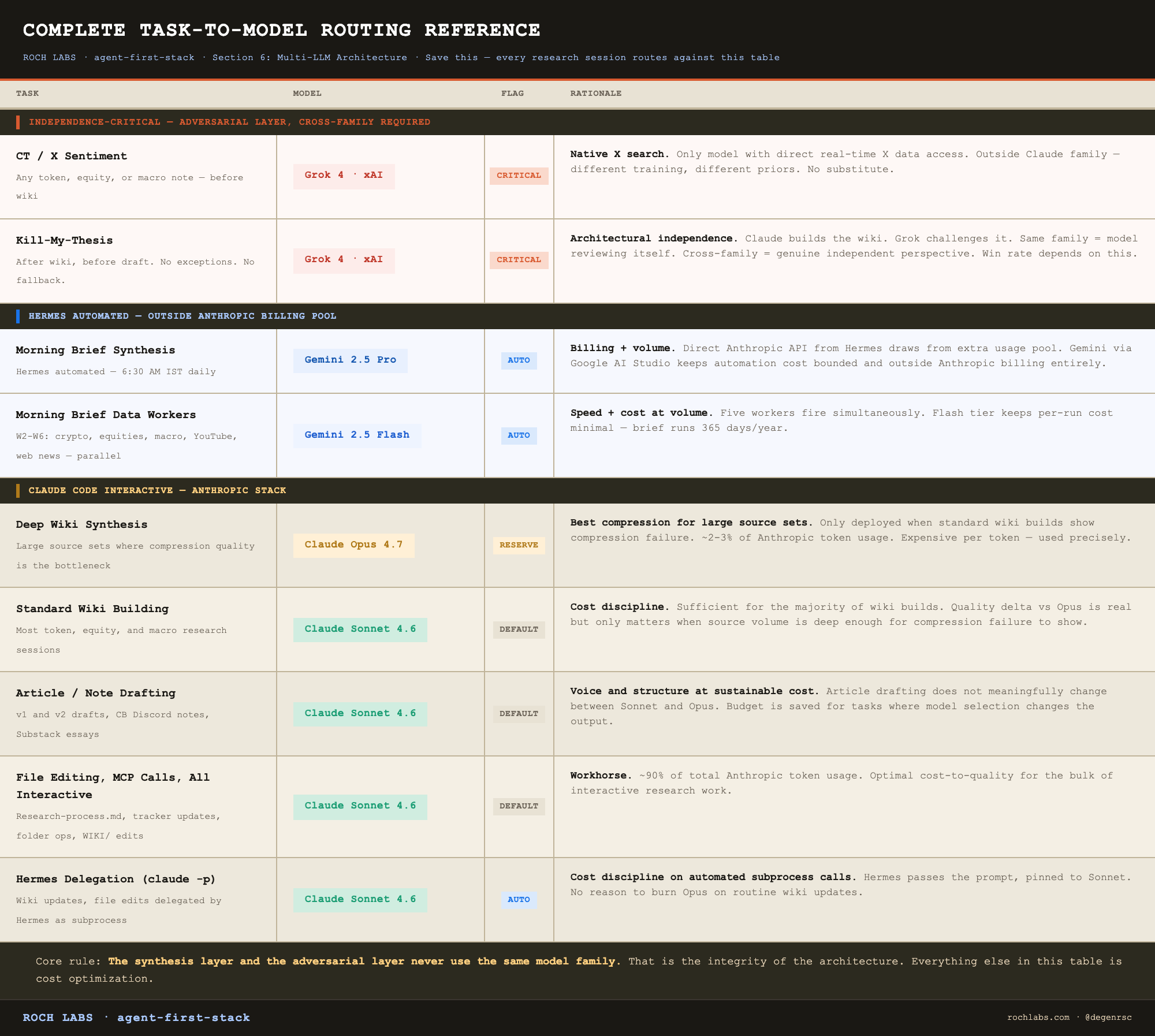
The design principle compressed into one line: the synthesis layer and the adversarial layer never use the same model family. That is the integrity of the architecture. Everything else is cost optimization.
Cost discipline
The reason this routing matters financially: model selection determines the monthly cost of the entire system more than any other variable.
Sonnet 4.6 handles roughly 90% of token usage across the stack. Interactive Claude Code sessions, wiki edits, draft generation, file management. All Sonnet. The bulk of the cost lives here, and Sonnet is priced to make that bulk sustainable.
Opus 4.7 runs on selected large wiki builds in Claude Code sessions. Roughly 2 to 3% of Anthropic token usage. The cost per call is high, but the call frequency is low, so the absolute monthly cost stays bounded. Morning brief synthesis has moved to Gemini 2.5 Pro, billed through Google AI Studio at a rate that keeps the Gemini cost line modest relative to what Opus synthesis was costing.
Grok runs on every CT sentiment and every kill-my-thesis. Roughly 5% of total spend, but a critical 5%. The cost is $0.10 to $2.00 per run, which is meaningful, but the per-note ceiling is around $2.50 across both Grok calls combined. On 30 research notes per month, that is $75 worst case. The win rate improvement pays for it many times over.
The rule, stated simply: expensive models run only on the tasks where model selection materially changes the output. CT sentiment changes when you switch from Claude to Grok (because Claude does not have X search). Adversarial checks change when you switch from Claude to Grok (because of independence). Brief synthesis in Hermes runs on Gemini Pro: billing and volume both fit better outside the Anthropic stack. Wiki synthesis in Claude Code sessions runs on Opus when source volume warrants it. Article drafting does not meaningfully change between Sonnet and Opus. So drafting runs on Sonnet and the budget gets spent where it produces a different output.
This is what keeps the full stack at sub-$250 per month. The routing is not just an architectural choice. It is the cost model.
What this layer gives you
Five models, four roles, one structural rule: the model that synthesizes the thesis cannot be the model that adversarially checks it. Grok handles the independence-critical work because it is outside the Claude family. Gemini 2.5 Pro handles Hermes synthesis because billing and volume both fit better outside the Anthropic stack. Opus handles deep wiki compression in Claude Code sessions when source volume warrants it. Sonnet handles the bulk of interactive work at the right cost-to-quality ratio.
The three real kill-my-thesis verdicts on $ETH, $KAS, and $NEAR are the proof that the architecture works as designed. Same-family critique would have missed those catches. Cross-family critique caught all three. The notes shipped sharper for it, and the win rate of the system depends on this layer holding.
Section 7 covers the research workflow that ties all of this together: a nine-step protocol that routes each step through the right model and the right tool, with no-skip rules and a full session walkthrough from first command to published note.
Section 7: The Research Workflow
Nine steps. Some are non-negotiable. Some adapt by research type and by whether Hermes is running. Every shortcut in this sequence has been tested and found to degrade output quality, usually visibly by the time the note is published.
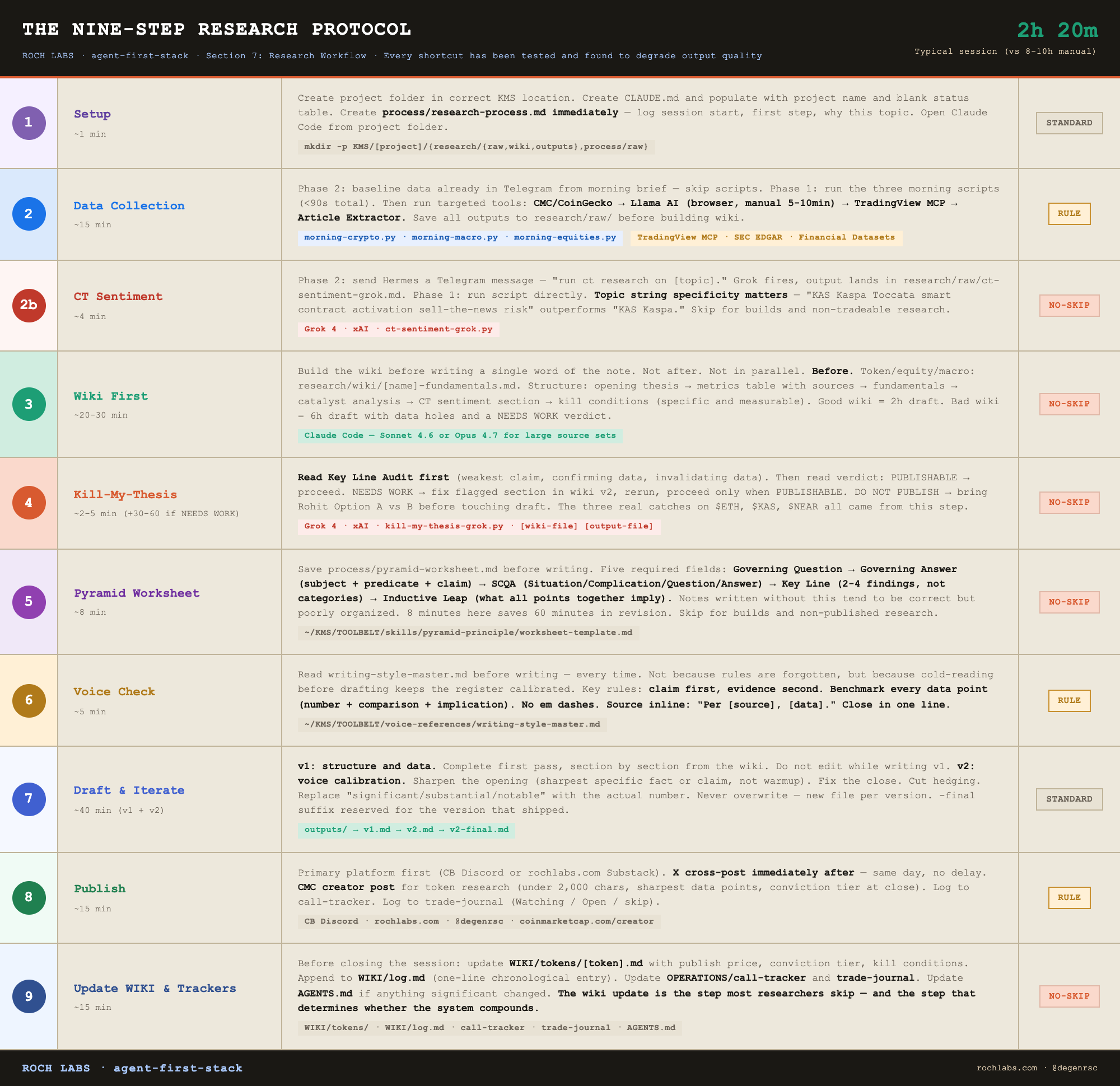
This section documents the protocol and then walks through a complete session from project setup to published note with real timings. The steps are the architecture. The walkthrough is what they feel like to run.
Where research sessions come from
Research sessions are not triggered by any single upstream system. They are triggered by whatever catalyst makes a topic worth a fresh pass: a CB community member asking for more depth on a token they hold, an X post that surfaces a thesis angle, a macro release that opens a window, a position in the trade journal nearing a catalyst date. The QCOM edge inference angle in late May 2026 came from a morning brief that flagged @karpathy’s 60/40 inference shift thesis and a QCOM +11.6% Friday move. The $OCT research had nothing to do with the morning brief. Both were equally valid sessions.
The morning brief is a parallel intelligence layer, not a workflow trigger. It runs daily at 6:30 AM IST and reads two curated streams (selected YouTube channels and X handles), synthesizes the past 24 hours of relevant output, and surfaces research ideas, tokens, equities, and macro angles worth investigating. The output lands in Telegram and feeds `~/KMS/OPERATIONS/intelligence/idea-tracker.md`. Some of those ideas become research sessions. Most do not. The brief is one input among several.
The workflow below describes what happens once a topic has been chosen, regardless of how it surfaced.
Phase 1 vs Phase 2 readers
Two reader states for this section, and the difference is narrower than it sounds.
Phase 1 (no Hermes yet): Every research session starts without baseline market data already in hand. You run the data collection scripts at session start to pull current prices, macro context, and equity quotes. You invoke ct-sentiment-grok.py directly from the terminal.
Phase 2 (Hermes running): Hermes ran the same data collection scripts as part of the morning brief at 6:30 AM IST. The baseline market data is already in your Telegram. When the research session starts later in the day, you reference that data as background context rather than running the scripts again. CT sentiment is invoked by sending Hermes a Telegram command.
The distinction is about data efficiency, not workflow triggering. Phase 2 saves the cold-start data pull. The targeted MCPs for the specific research topic and the actual research steps look the same in both phases.
Step 1: Setup
Create the project folder in the correct KMS location. The location is determined by brand and asset class.
```bash
# CB token research
mkdir -p ~/KMS/COIN-BUREAU/token-research/kaspa/{research/{raw,wiki,outputs},process/raw}

# ROCH Labs equity research
mkdir -p ~/KMS/ROCH-LABS/equity-research/QCOM/{research/{raw,wiki,outputs},process/raw}

# General research
mkdir -p ~/KMS/RESEARCH/agent-first-stack/{research/{raw,wiki,outputs},process/raw}
```
Create CLAUDE.md at the project root. Populate it with the project name, initial status (all phases PENDING), and a blank next steps section. This file is updated at every step throughout the session. It is not a one-time setup artifact.
Create `process/research-process.md` immediately. Log the session start: what you are researching, why, what the first step is. Update it at every decision point. Not at the end. Throughout.
Open Claude Code from the project folder:
```bash
cd ~/KMS/COIN-BUREAU/token-research/kaspa
claude
```
The agent reads the global CLAUDE.md, the KMS root CLAUDE.md, and the project CLAUDE.md in that order. It knows who you are, what system it is operating in, and what project it just opened. Start.
Step 2: Data collection
Phase 2 path. If Hermes is running, baseline market data from the morning brief is already in Telegram. You have current prices, macro context, equity quotes, and overnight signals without running anything. Use that as background context. The morning brief also includes a watchlist status table with every open position, which is useful when the research topic is a token already in the journal.
Then run the targeted tools for the specific research topic.
Phase 1 path. Run the data scripts manually at session start to pull the same baseline data Hermes would have generated:
```bash
python3 ~/KMS/TOOLBELT/scripts/morning-crypto.py
python3 ~/KMS/TOOLBELT/scripts/morning-macro.py     # if macro context is relevant
python3 ~/KMS/TOOLBELT/scripts/morning-equities.py  # if equity context is relevant
```
Each script returns a structured JSON blob saved to `research/raw/`. Total execution time for all three: under 90 seconds. Then proceed to the same targeted tools Phase 2 users would call.
Targeted tool priority order, by research type.
For tokens:
1. CoinMarketCap or CoinGecko: confirm price, market cap, FDV, circulating supply
2. Llama AI (browser-based): TVL, protocol revenue, competitive intel
3. TradingView MCP: chart analysis, key levels, indicator readings
4. Article Extractor: project documentation, recent research reports, news
5. YouTube Transcript: team presentations, podcasts, analyst takes
One note for pre-listed tokens not in CoinMarketCap: morning-crypto.py has a `DEX_OVERRIDES` dictionary that points to GeckoTerminal pool URLs. Add the token there and the script pulls the price from the DEX pool directly.
For equities, replace items 2 and 3 with SEC EDGAR (10-K, 10-Q, 8-K, earnings transcripts) and Financial Datasets (earnings, KPIs, insider trades). For macro notes, FRED covers most of the structural data and YouTube Transcript covers the analyst commentary.
Everything that informs the wiki must be saved to `research/raw/` before the wiki is written. No drafting from memory or from browser context that was not exported.
Llama AI: the honest manual bottleneck
Llama AI is built by DefiLlama and is not a chatbot trained on on-chain data. It is an agent harness that queries live data in real-time. When you type a research prompt, it pulls from DefiLlama’s full dataset (TVL, protocol revenue, fee data, chain comparisons), reaches into Dune Analytics for custom on-chain queries, queries block explorers to analyze smart contracts and transactions directly, and can cross-reference X. That combination, live multi-source on-chain intelligence from a single prompt, is not replicated by any MCP in this stack. Llama AI gives you protocol economics, competitive positioning, and smart contract behavior in one pass.
For any token research note where the thesis depends on protocol fundamentals, the Llama AI pull is the single most informative data source in the pipeline. The friction is worth tolerating because what it returns is not available elsewhere at the same depth.
It also has no MCP. It runs in a browser. It requires an authenticated session. The output has to be manually exported as markdown and saved to `research/raw/` by hand.
This is the last remaining manual step in the data collection pipeline, and the article will not paper over it. Both Phase 1 and Phase 2 users hit the same friction here. Hermes cannot run Llama AI on a VPS. Claude Code cannot trigger it through an MCP. You open the browser, type the prompt, wait for the response, copy the markdown, paste it into a file in `research/raw/`. That is the workflow.
Browser automation for Llama AI is on the Phase 3 roadmap. The plan is documented: Hermes opens a browser session via the browser-use Python library, logs into Llama AI with stored credentials, types the prompt, polls for completion, saves the markdown, and pings Telegram when done. Until that ships, the manual step stays. Plan around it. Allocate five to ten minutes per research session for the Llama AI loop and do it once, not iteratively.
Step 2b: CT sentiment
This step has gone through three versions. The current one matters because it is the version this stack actually runs.
Stage 1 (abandoned): A bun-based CLI skill that called the X API directly. Technically correct, structurally too expensive. X API credits burned faster than the signal justified, and the cost per CT sentiment run made it impractical to run on every note. Pulled from the workflow within weeks of trying it.
Stage 2 (transitional): Llama AI manual x-search. Llama AI has an x-search capability built in, and the monthly subscription was already paid. The workflow: open Llama AI in browser, run the CT sentiment prompt, copy the markdown, paste into `research/raw/ct-sentiment.md`. It worked. The friction was the manual copy step on every research session, which compounded across multiple notes per week.
Stage 3 (current, since May 2026): Grok 4 via Hermes. The current flow is the cleanest of the three and the one that ships.
For Phase 2 users, the invocation is a single Telegram message to Hermes:
```
run ct research on kaspa
```
Hermes interprets this as a request to run the ct-sentiment-grok skill, fires the script with the correct topic string and output path, and the markdown lands directly in the project’s `research/raw/ct-sentiment-grok.md`. There is no Telegram notification when it completes. This is not a brief, it is a targeted research tool. The output goes to the file system, Claude Code reads it from there in the next interactive session.
For Phase 1 users, run the script directly from the terminal:
```bash
python3 ~/KMS/TOOLBELT/scripts/ct-sentiment-grok.py \
  'KAS Kaspa Toccata smart contracts' \
  'kaspa/research/raw/ct-sentiment-grok.md'
```
Same output, same destination, same downstream behavior. The Hermes wrapper is convenience, not a different process.
The topic string is the most important parameter. “KAS Kaspa” gives Grok a broad search. “KAS Kaspa Toccata smart contract activation sell-the-news risk” gives it a focused one and produces a meaningfully sharper output. Be specific.
CT sentiment runs on every token, equity, and macro note. It is skipped for builds and general research projects that do not map to a tradeable instrument.
Step 3: Wiki first
Build the wiki before writing a single word of the note. Not after. Not in parallel. Before.
The wiki is not a draft. It is a structured knowledge dump: all the data organized, all sources cited, all angles mapped, every kill condition named. It is the document the draft is written from. The quality of the wiki determines the quality of the draft more than any other single variable.
For token, equity, and macro research: `research/wiki/[name]-fundamentals.md`. Structure: opening thesis, key metrics table with sources, protocol fundamentals or business model breakdown, catalyst analysis, CT sentiment section (crowding level, top signals, Tier 1 takes), kill conditions (specific and measurable, not vague), prior coverage notes.
For builds: two files. `research/wiki/[name]-spec.md` (technical specification) and `research/wiki/[name]-context.md` (strategic positioning, differentiation, reader framing).
Good wiki, 2-hour draft. Bad wiki, 6-hour draft with data holes and a kill-my-thesis NEEDS WORK verdict. The time invested at this step is recovered in every subsequent step.
Step 4: Kill-my-thesis
After the wiki, before drafting. Always.
```bash
python3 ~/KMS/TOOLBELT/scripts/kill-my-thesis-grok.py \
  'kaspa/research/wiki/kaspa-fundamentals.md' \
  'kaspa/research/raw/kill-my-thesis-grok.md'
```
The report has two primary outputs, and reading order matters.
The first is the Key Line Audit: the weakest claim in the thesis’s supporting argument, the specific data that would confirm it, and the specific data that would invalidate it. This is the actionable output. It tells you exactly what to fix in the wiki or what to watch for in the market before publishing. Read this section first.
The second is the verdict:
PUBLISHABLE: The thesis holds under adversarial pressure. Proceed to draft.
NEEDS WORK: A specific section or claim fails. The report names it. Fix that section in the wiki (save as v2), rerun kill-my-thesis on the updated version, and proceed only when the verdict changes to PUBLISHABLE. This adds 30 to 60 minutes to the session. It is not optional.
DO NOT PUBLISH: The thesis has a structural flaw serious enough that the note should not ship in its current form. Escalate. Decide whether the thesis is salvageable or whether the research was directionally wrong.
The three real verdicts on $ETH, $KAS, and $NEAR in Section 6 all returned NEEDS WORK on first run. All three notes published stronger for it. The adversarial layer is not a bureaucratic checkpoint. It is the step that keeps the win rate from collapsing over time.
Step 5: Pyramid Worksheet
Before drafting, complete the planning worksheet at `process/pyramid-worksheet.md`. The template is at `~/KMS/TOOLBELT/skills/pyramid-principle/worksheet-template.md`. This step takes five to ten minutes and determines the structural quality of everything written after it. Notes written without it tend to be correct but poorly organized. The data is there, the structure is not, and revision time exceeds the time the worksheet would have taken.
Five required fields:
Governing question. The single question this note answers, from the reader’s perspective. Not what you want to say. What the reader is asking.
Governing answer. Subject plus predicate plus claim. Not a topic (”Toccata is a major event for Kaspa”) but a thesis (”Toccata is a buy trigger on developer demand confirmation, not on launch date, because the Kadena precedent shows 60% post-launch retracement without real demand as the base case”).
SCQA. Situation (what CT currently believes about this token), Complication (the specific on-chain finding or CT signal that contradicts or complicates it, a named fact, not a vague tension), Question (is CT right?), Answer (your thesis).
Key Line. 2 to 4 supporting points stated as findings, not as categories. “Sell-the-news risk is real and quantified via the Kadena comparable” is a finding. “Risks” is a category. Every Key Line point must pass the blank assertion test: if you can replace the point with “there are two things about this” without losing anything, it is a category. Rewrite it.
Inductive leap. What all Key Line points together imply. The insight that emerges from the combination, stated in one sentence.
The worksheet does not constrain the draft. It focuses it. Every section header in the note should be a finding derived from the Key Line, not a category label. The inductive leap is the thesis in its sharpest form.
After the draft is complete, run the five post-draft checks in `~/KMS/TOOLBELT/skills/pyramid-principle/quick-reference.md’ before declaring the note done.
Step 6: Voice check
Read `~/KMS/TOOLBELT/voice-references/writing-style-master.md` before writing. Every time. Not because the rules are forgotten, but because cold-reading them before drafting keeps the register calibrated. The gap between reading the style guide and drafting should be minutes, not hours.
Key rules the guide enforces:
- Claim first, evidence second. Always. Never context before claim.
- Benchmark every data point. Raw number, comparison, implication. The comparison is the argument.
- No em dashes. Replace with period, comma, or colon.
- Source inline: “Per [source], [data].” Never footnotes.
- One voice marker per note maximum.
- Close in one line.
Step 7: Draft and iterate
v1: structure and data. Get everything on paper. Follow the wiki section by section. Do not edit while writing v1. The goal is a complete first pass, not a polished partial.
v2: voice calibration. Apply the style guide. Sharpen the opening so the first sentence is the sharpest specific fact or claim in the note, not a warmup. Fix the close. Cut the hedging language. Replace every vague modifier (”significant,” “substantial,” “notable”) with the actual number.
Never overwrite. New file per version.
```
research/outputs/
├── kaspa-v1.md
├── kaspa-v2.md
└── kaspa-v2-final.md
```
The `-final` suffix means the note published. Apply it only to the version that shipped.
Step 8: Publish
See Section 8 for the full publishing sequence. In brief: primary platform first, X cross-post immediately after, CMC creator post for token research, then tracker and journal updates.
Step 9: Update WIKI and trackers
After publishing, before closing the session:
1. Update `~/KMS/WIKI/tokens/[token].md` with publish price, conviction tier, and any post-publication insight worth retaining
2. Append to `~/KMS/WIKI/log.md`: `## [YYYY-MM-DD] research | [topic]: [one-line summary]`
3. Update `OPERATIONS/call-tracker/outputs/call-tracker.md` with the new row
4. Update `OPERATIONS/trade-journal/outputs/trade-log.md` with status (Watching / Open / skip)
5. Update `AGENTS.md` if anything significant changed: new MCP, new skill, position entered
The wiki update in step 1 is the step most researchers skip. It is also the step that determines whether the system compounds. Skipping it once is fine. Skipping it habitually means the wiki drifts behind the research, and future sessions start from progressively less current context. That is the compounding effect running in reverse.
What a complete session looks like
This is the experience of running the full protocol once, not the step list. A 1,500-word CB token note on Kaspa. Real timings. The session is triggered by a CB community member asking in #questions whether the Toccata smart contract activation is worth a fresh research pass, given the launch window opens in two weeks. The KAS position has been in the trade journal as Open Long since the prior note. A fresh look is warranted.
9:00 AM. Open terminal. `cd ~/KMS/COIN-BUREAU/token-research/kaspa`. Open Claude Code. The agent reads CLAUDE.md and reports current status: prior research from May 2025 archived, no active wiki, kill-my-thesis not yet run on the current cycle. The morning brief is open on the phone as background reference: KAS at $0.03373 overnight, +2.64%, Toccata window June 5 to 20 still on the catalyst tracker. One minute to confirm the session goal: fresh wiki and a publishable note within the working day.
9:01 AM. Targeted data pull. Tell Claude Code to confirm current market data via CoinMarketCap (price $0.034, market cap $830M, FDV $1.2B, 24h volume $47M). Launch TradingView MCP: chart_set_symbol to KASUSDT, 1W timeframe, add Volume Profile Fixed Range and RSI. Pull current readings (RSI 42, neutral; key resistance at $0.048, the 2025 high). Screenshot saved to `process/raw/tv-weekly-2026-05-28.png`. Five minutes.
9:06 AM. Llama AI pull (manual). Open the browser. Type the Kaspa research prompt into Llama AI: protocol economics, on-chain activity trend through the prior 90 days, Toccata testnet developer signups if available, competitive comparison with Kadena post-smart-contract activation. Wait for the response. Copy the markdown. Paste into `research/raw/llama-kaspa-2026-05-28.md`. Eight minutes including wait time. This is the manual bottleneck. It is what it is until browser automation ships.
9:14 AM. Trigger CT sentiment. Send Hermes a Telegram message: “run ct research on kaspa.” Hermes fires ct-sentiment-grok.py with the topic string “KAS Kaspa Toccata smart contract activation sell-the-news risk.” The output lands in `research/raw/ct-sentiment-grok.md` 45 seconds later. No Telegram notification. Tell Claude Code to read it. Crowding MEDIUM. Top bear signal: Kadena comparable, a PoW chain that launched smart contracts to no developer demand. Note it. The Kadena comparable becomes a kill condition in the wiki.
9:18 AM. Build wiki. Agent reads all raw data and builds `kaspa-fundamentals-v1.md`. Thesis, metrics table, Toccata analysis, CT sentiment section, three kill conditions. 20 minutes. Review the wiki. Kadena comparable is in there but the specific numbers (40% pre-launch pump, 60% retracement over 90 days) are missing. Add them in place. Still v1 of the wiki, no material structural change.
9:45 AM. Run kill-my-thesis. Two minutes. **NEEDS WORK.** Two issues flagged: Kadena comparable lacks quantification, and developer demand data for Kaspa smart contracts does not exist. The wiki was built by Claude. The adversarial check comes from Grok 4. A different model family, different training data, different priors. The catches reflect that independence rather than a same-family second opinion.
Fix both issues in wiki v2: add the Kadena numbers explicitly (40% pre-launch pump, 60% retracement over 90 days post-launch), add a kill condition stating “no measurable dev demand within 30 days of Toccata launch.” Save as `kaspa-fundamentals-v2.md`.
10:00 AM. Rerun kill-my-thesis on v2. Two minutes. PUBLISHABLE. Proceed.
10:02 AM. Pyramid Worksheet. Open `process/pyramid-worksheet.md`. Governing question: is Toccata a buy trigger for $KAS? Governing answer: Toccata is a buy trigger on developer demand confirmation, not on launch date, because the Kadena comparable establishes a 60% post-launch retracement without real demand as the base case. SCQA: CT is positioned for a catalyst trade (S), the Kadena on-chain data shows why launch-date entry is the wrong frame (C), the question is whether demand confirmation arrives within a tradeable window (Q), answer is wait for 30-day demand signal not launch date (A). Key Line: three findings. Inductive leap: the trade is confirmation-based, not launch-based. Saved to file. Eight minutes.
10:10 AM. Read writing-style-master.md. Five minutes. Register calibrated.
10:15 AM. Draft v1. Agent writes `kaspa-v1.md` from the v2 wiki. 20 minutes. Complete first pass: opening catalyst, on-chain data, Toccata mechanics, Kadena bear case, kill conditions, conviction tier (Medium given sell-the-news risk).
10:35 AM. Voice calibration for v2. Opening sharpened to lead with the Toccata window (June 5 to 20) rather than a warmup sentence. Em dash spotted in paragraph 3, replaced with a period. “Significant” in paragraph 5 replaced with the specific number (”+18% in 30 days”). Close tightened to “Watching closely.” 20 minutes.
10:55 AM. Final review. Read through once as a skeptical reader. One data point sourced loosely (”per the team” instead of a specific announcement). Found the source, updated to an inline citation. Save as `kaspa-v2-final.md`.
11:05 AM. Publish. CB Discord, #research-feed. X cross-post via @degenrsc. CMC creator post drafted as `kaspa-cmc-post.md` (under 2,000 characters). Call-tracker row added. Trade-journal entry: Watching, entry zone $0.030 to $0.036, stop $0.026, trigger Toccata launch plus measurable dev activity within 30 days.
11:20 AM. Wiki and log update. `WIKI/tokens/kas.md` updated with publish price, Medium conviction, and the kill condition. `WIKI/log.md` entry appended. AGENTS.md scanned for anything significant to update (no change). Session closed.
Total time at the desk: 2 hours 20 minutes. Same note done manually with a chatbot and browser research: 8 to 10 hours.
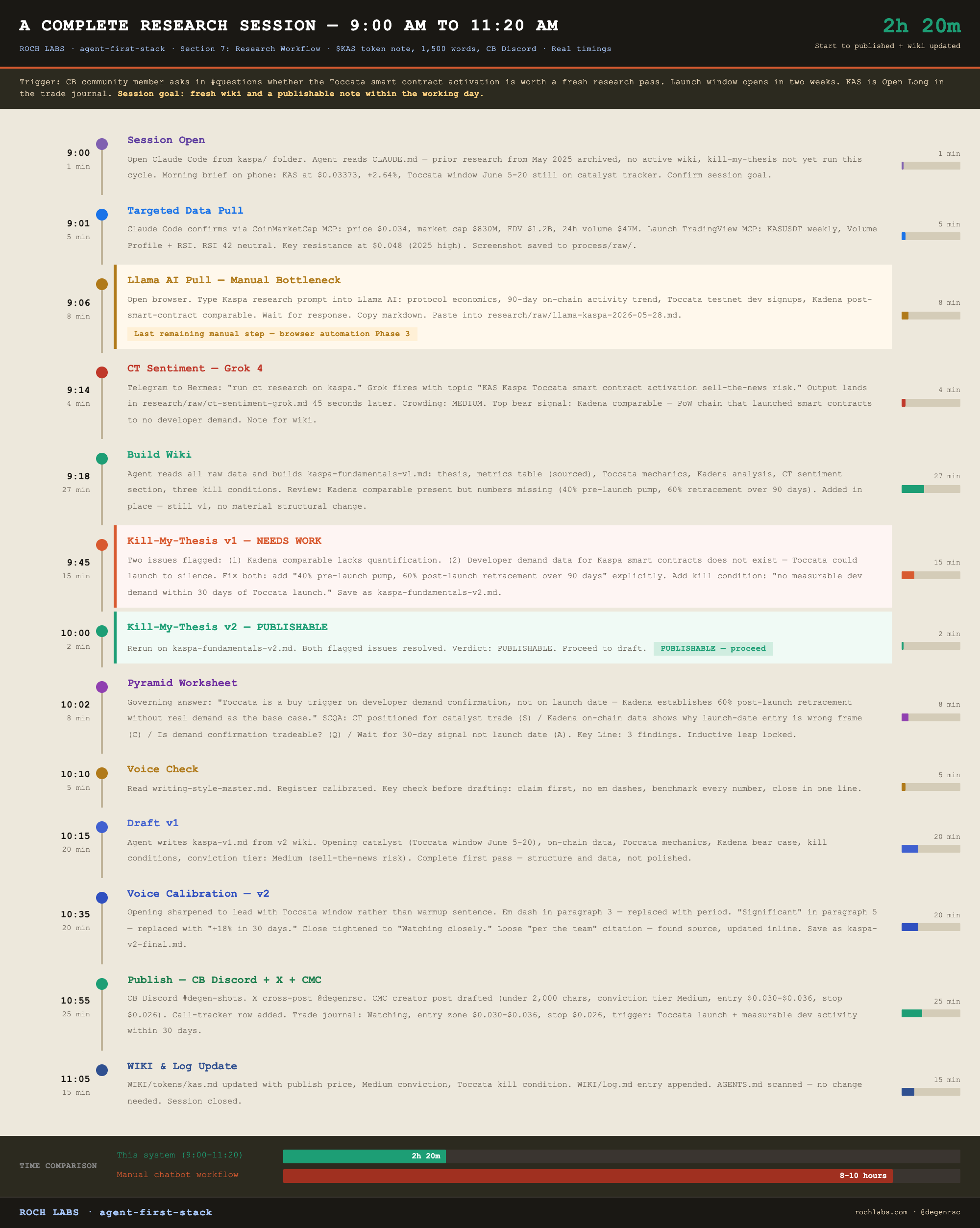
The data hierarchy
When sources conflict, and they will, the priority order is fixed.
1. On-chain data (Llama AI, direct protocol queries): primary
2. Protocol fundamentals (revenue, TVL, user metrics with sources): secondary
3. Market data (price, volume, FDV from CMC or CoinGecko): tertiary
4. CT sentiment (Grok x_search output): signal, not evidence
Narrative never overrides on-chain data. If CT says one thing and on-chain says another, on-chain wins, and the CT signal goes into the bear case section of the wiki rather than the bull case. The kill-my-thesis step exists partly to enforce this hierarchy when data collection and narrative drift apart during wiki building.
Section 8 covers what happens after the note is published: the content operations flywheel that turns one research session into three publishable artifacts, and the tracker discipline that keeps the win rate measurable rather than aspirational.
Section 8: Content Operations
One research session produces three publishable pieces. Most researchers produce one. The delta is not effort, it is structure.
The three pieces:
1. The research note. The primary output. Published to CB Discord or Substack. 800 to 1,500 words, fully sourced, conviction tier assigned, kill conditions named. This is what the session was built to produce.
2. The process documentation. The `research-process.md` file and `process/raw/` screenshots. How the research was done, which tools were fired, in what sequence, what the kill-my-thesis verdict was, where the wiki required revision before the draft could proceed. This is latent content: an X thread on AI research workflow, a Substack companion on the process behind the note, a YouTube screen-share showing the system in action.
3. The AI workflow screenshots. Terminal views showing Claude Code mid-session, TradingView MCP pulling chart data, the kill-my-thesis verdict document, the CT sentiment output before the wiki was built. These are the visual proof that the system runs. Saved to `process/raw/` during the session as a byproduct of the work, not as a separate production effort.
Pieces 2 and 3 cost approximately 10 minutes of overhead per session once the documentation habit is built. Over 50 research sessions, that overhead produces 50 additional content assets: X threads, YouTube clips, Substack companion pieces, that are completely distinct from the research itself and that document a workflow most readers have never seen.
That is the flywheel. One session, three pieces, zero double production.
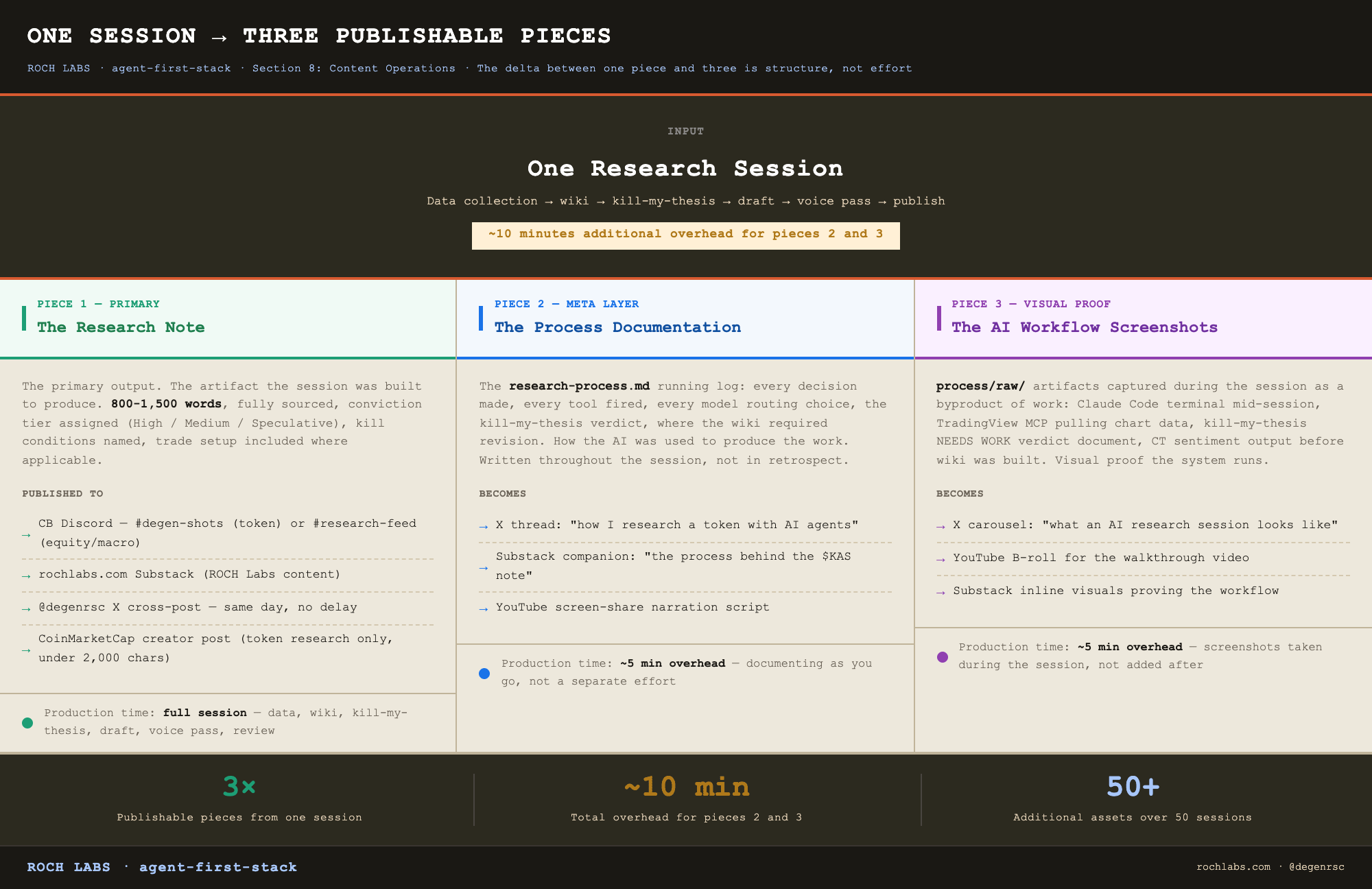
The universal publishing sequence
Every piece of content, regardless of platform or asset class, follows the same sequence after the draft is approved:
1. Publish to primary platform.
- CB token research: #degen-shots on CB Discord
- CB equity or macro: #research-feed on CB Discord
- ROCH Labs: rochlabs.com Substack
2. Cross-post to X immediately. @degenrsc. All content types, every time, no exceptions. The cross-post is not a summary or a teaser, it is the same note formatted for X, posted natively, the same day the primary platform sees it.
3. CMC creator post (token research only). Draft saved locally as `research/outputs/[token]-cmc-post.md` before publishing. Under 2,000 characters. Same voice as the main note, sharpest data points only, no filler, no softening. Conviction tier at the close. Entry zone and stop if applicable. Published manually on coinmarketcap.com as a verified creator post.
4. Log to call-tracker. One new row in `OPERATIONS/call-tracker/outputs/call-tracker.md`. Source (CB or ROCH Labs), asset, date, conviction tier, entry zone, stop, initial thesis in one sentence.
5. Log to trade-journal. Status: Watching (thesis built, no entry yet), Open (entered), or skip (equity or macro note with no direct trade setup). Skip is a valid status, macro notes and equity notes that are not actionable as a position go here.
The call tracker
Every published research call gets a row. The discipline is in committing to a thesis and a stop at the moment of publication, not in retrospect.
Current state as of May 2026: 41 tracked calls, 66% win rate (68% excluding $SWTCH), 244% average return on closed positions.
That track record is not the point of the tracker. The point is the accountability it creates. A researcher who publishes calls without tracking them has no feedback loop between thesis quality and outcome. The tracker closes that loop. It answers the only question that matters: is the research actually working?
The call-tracker template is in `~/KMS/TOOLBELT/skills/coinbureau-research/references/log-new-call-template.md`. Use it on every publish. Columns include source, asset, date, conviction tier, entry zone, stop, target 1, target 2, current status, outcome, and notes. Status states: Watching, Open, Closed (Win), Closed (Loss), Closed (BE).
The trade journal
The trade journal is separate from the call tracker and serves a different function. The call tracker is the research record. The trade journal is the position record.
The framework is PTJ (Paul Tudor Jones): thesis first, confirmation second, size discipline, stop placement, no averaging down. Every position in the journal has a thesis (why this asset), a confirmation signal (what triggers entry), a stop (the level that invalidates the thesis), and at minimum one target.
Status states: Watching, Open, Closed.
Watching means the thesis is built and published, but entry has not been triggered. The position monitor in the evening brief watches these. When the confirmation signal fires, Watching moves to Open.
Open means the position is live. The evening brief pulls live prices against every Open position daily and surfaces anything notable from CT on the tracked tickers. No position stays Open without a live stop.
Closed means the position has been exited. Outcome (Win, Loss, or Breakeven) and the post-mortem note go in the journal at close. The post-mortem is one sentence: what the thesis got right, what it missed, and whether the exit was disciplined or emotional.
Trade journal file: `OPERATIONS/trade-journal/outputs/trade-log.md`.
The CMC creator post
Token research only. Published on coinmarketcap.com as a verified creator post after the primary platform and the X cross-post.
Format rules:
- Under 2,000 characters, hard limit
- Same voice as the main note, no softening for a broader audience
- Lead with the sharpest data point in the note, not a summary of what the article covers
- Conviction tier at the close: HIGH, MEDIUM, or SPECULATIVE
- Entry zone and stop if there is a trade setup, omit if not
- No em dashes
- Save the draft as `research/outputs/[token]-cmc-post.md` before publishing manually
The CMC post is not a truncated version of the main note. It is the note’s sharpest argument compressed into a standalone piece. A reader who only sees the CMC post should understand the thesis, the key data point, the risk, and the conviction level.
Publishing stacks by platform
ROCH Labs:
Substack (rochlabs.com) is the primary record. Every long-form essay publishes there first.
YouTube (@rochlabs) follows with a screen-share walkthrough of the same article. Not a separate script, a live screen-share with verbal commentary over the written piece. Same content, different medium, different discovery surface.
X (@degenrsc) gets two versions: a native X article (the Substack essay reformatted for X) and a truncated standalone post. The native video from the YouTube walkthrough is uploaded directly to X, never as a YouTube link. X suppresses external links in the algorithm. Native video is treated differently.
Coin Bureau:
CB Discord is the primary channel. #degen-shots for token research. #research-feed for equity and macro.
X cross-post goes out the same day, same note, no delay.
CMC creator post goes out for all token research, same day.
The separation between CB and ROCH Labs content is structural. CB content does not automatically become ROCH Labs content. Cross-pollination, taking a CB thesis and developing it into a longer ROCH Labs essay, requires a conscious decision, and the ROCH Labs version is written from scratch rather than republished.
What the operations layer gives you
A published note with no tracker update is a research event with no institutional memory. Six months later, there is no way to know whether the thesis worked, what the entry and stop were, or whether the system is improving.
The operations layer, call tracker, trade journal, CMC post, cross-posting sequence, is what turns a content operation into a compounding one. The tracker builds a track record that is auditable. The trade journal enforces position discipline. The cross-posting sequence ensures every piece reaches every relevant surface. The CMC post builds a verified creator presence on the platform where retail investors actively research tokens.
None of this is glamorous. All of it is what separates a researcher who produces content from a researcher who runs a research operation.
Section 9 covers where this build goes next: the end state of a fully autonomous research studio, what Phase 3 looks like, and the honest timeline for getting there.
Section 9: The End State
The build has three phases. Phase 1 is complete. Phase 2 is live as of May 2026. Phase 3 is what the next six to twelve months build toward. The sequence matters more than any individual phase. Reversing it, or skipping ahead, produces an automation layer that runs on top of a workflow no one understands, which is the single most common failure mode in this category.
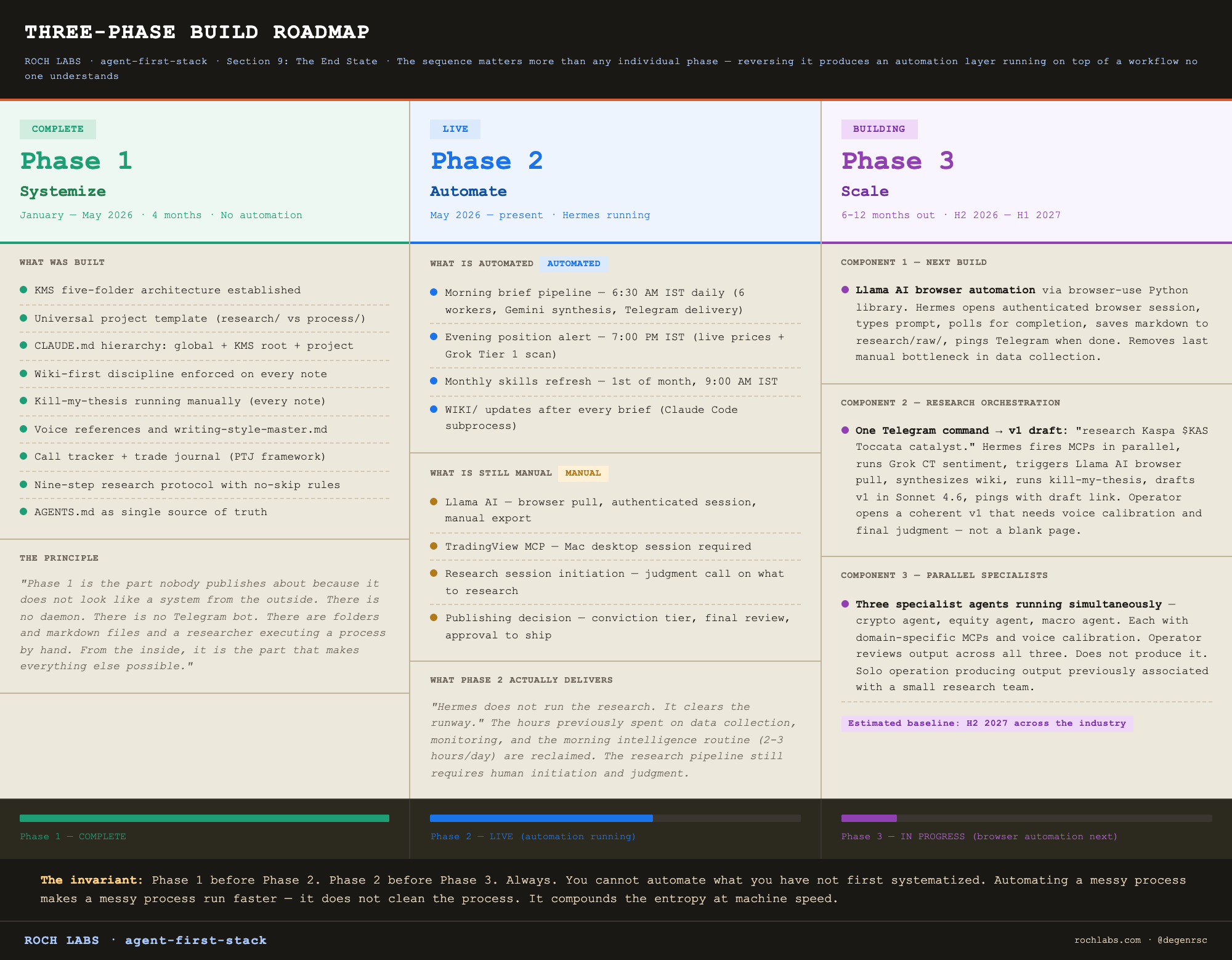
This section documents what is built, what is being built, and what cannot be built until the prior thing is.
Phase 1: Systemize. Complete. January to May 2026.
The principle that made Phase 1 necessary is the most important sentence in this entire article for anyone thinking about building something like it.
You cannot automate what you have not first systematized.
This is not obvious advice. The default behavior, for anyone who has watched Hermes deliver a morning brief at 6:30 AM, is to want that experience immediately. To spin up a VPS, install the daemon, schedule a cron, and skip the months of manual workflow that preceded it. Most builds in this category fail there. They fail because automating a messy process makes a messy process run faster. The automation does not clean the process. It compounds the entropy at machine speed, and then the operator has a fast, broken pipeline that fails in ways they cannot diagnose because they never understood the process manually in the first place.
Phase 1 of this build ran for four months and produced no automation. It produced a system. The KMS folder structure. The universal project template. The CLAUDE.md hierarchy across global, KMS root, and project levels. The wiki-first discipline. The kill-my-thesis adversarial layer running manually before any wiki was drafted into a note. The voice references. The call tracker. The trade journal. The publishing sequence. The nine-step research workflow with no-skip rules.
By the time Phase 2 began, every step in the workflow had been run manually dozens of times. The failure modes were documented. The gotchas were named. The boring parts were boring enough to be worth automating, and the non-boring parts (thesis selection, kill condition naming, conviction tier assignment, draft review) were obvious as non-automatable because they had been run manually long enough to feel the parts of the process that resist abstraction.
Phase 1 is the part nobody publishes about because it does not look like a system from the outside. There is no daemon. There is no Telegram bot. There are folders and markdown files and a researcher executing a process by hand. From the inside, it is the part that makes everything else possible.
Phase 2: Automate. Live as of May 2026.
Phase 2 is the part this article has been documenting throughout. What it actually delivers, in honest terms, is narrower than the surface impression of a fully autonomous research studio. Here is what is automated and what is still manual.
What is automated: the morning brief pipeline runs every day at 6:30 AM IST. Six Hermes workers fire in parallel (Grok x_search for overnight CT (W1), three Gemini Flash data workers for crypto, equities, and macro (W2–W4), one Gemini Flash worker for the curated YouTube transcripts (W5), one Gemini Flash worker for web news (W6)), Gemini 2.5 Pro synthesizes the six outputs into a single brief, a Gemini Flash pass validates the synthesis against the underlying worker data and flags hallucinations, and Telegram delivery lands on the phone before the day starts. The same pipeline then runs three internal phases: quality scoring against a rubric, idea extraction into the idea tracker, and wiki updates delegated to Claude Code via a Hermes subprocess call. The evening position alert runs at 7:00 PM IST on the same daemon, pulls live prices for every Open and Watching position in the trade journal, runs a Grok Tier 1 scan for anything notable on the tracked tickers, saves the brief to disk, and pushes it to Telegram. A monthly skills refresh job runs on the first of every month and reports any new Claude Code skills or Anthropic SDK changes worth knowing about.
What is still manual: Llama AI runs in a browser, requires an authenticated session, and cannot run on a Linux VPS, so every Llama AI pull during a research session is a human opening the browser, typing the prompt, waiting, and exporting the markdown. TradingView MCP requires the Mac desktop application launched in remote debug mode, so all chart analysis is a human Mac session. Research sessions themselves are still human-initiated, because the decision about what is worth researching this week is a judgment call that involves the call tracker, the trade journal, the morning brief, the prior conversations with the CB community, and the operator’s own reading of where the market is misallocating attention. And the publishing decision (draft v1 reads strong enough to ship; voice calibration applied for v2; final review passed; tracker updated; cross-post sent) is a human checkpoint at every step.
The honest Phase 2 picture is this. Hermes runs the intelligence infrastructure. The research pipeline still requires a human to initiate and conclude. The leverage is in the hours reclaimed from data collection, monitoring, and the morning intelligence routine that previously consumed two to three hours per day before any actual research could begin. Phase 2 does not run the research. It clears the runway.
Phase 2 took four months from conception to live automation, January through May 2026. The majority of that time was not building. It was running the manual workflow long enough to understand which steps were worth automating, which steps would break under automation, and which steps belonged to the human regardless of how good the tooling got.
Phase 3: Scale. Six to twelve months out.
Three components are being built toward, in this order.
The first is Llama AI browser automation. This is the next build and the one that removes the only remaining manual bottleneck in the data collection layer. The architecture is documented in the project plan: Hermes opens a browser session via the browser-use Python library, logs into Llama AI with stored credentials, types the research prompt, polls for completion, exports the markdown to the project’s `research/raw/` folder, and pings Telegram when done. First test runs a single session at a time. Once the single-session loop is reliable, the same pattern runs three parallel instances for sector deep dives that pull from multiple protocols simultaneously. When this ships, Phase 1 and Phase 2 readers alike stop spending five to ten minutes per research session on the Llama AI manual loop.
The second is a research orchestration skill. A single command that chains the full pipeline end to end. The command, typed into Telegram: `research Kaspa $KAS Toccata catalyst`. Hermes interprets the request, fires the targeted MCPs in parallel, runs Grok CT sentiment with a topic string derived from the request, triggers the Llama AI browser pull, hands the raw data set to the synthesis model for wiki building, runs Grok kill-my-thesis on the resulting wiki, drafts a v1 of the note in Sonnet 4.6, and pings Telegram with a link to the draft. The operator opens the draft. The draft is not blank. It is not a placeholder. It is a coherent v1 that needs voice calibration, conviction tier assignment, and a final review before publishing. The work of producing the draft has been done. The work of judging whether the draft should ship has not. That is the right split. One command from topic to draft.
The third is parallel specialist agents. A crypto agent, an equity agent, and a macro agent running simultaneously on their domains. Each one runs its own version of the orchestration skill, focused on its domain, with domain-specific MCPs and a domain-specific voice calibration step. The operator reviews and edits the output across all three. Does not produce it. This is the configuration that turns a solo research operation into something that produces output at a volume previously associated with small research teams, while keeping the editorial judgment in one person.
The timeline for Phase 3 is six to twelve months. The bottleneck is not tooling. The browser-use library exists. Hermes can spawn parallel subprocesses. Multi-agent orchestration patterns are documented in public agent frameworks. The bottleneck is the same one Phase 1 made explicit: the discipline of documenting and systematizing each new step before automating it. Llama AI browser automation cannot ship until the manual Llama AI workflow has been documented to the level of detail required for browser-use to replicate it deterministically. The orchestration skill cannot ship until the manual end-to-end pipeline has been run enough times to know where the model routing breaks, where the kill-my-thesis verdict needs to gate progression versus where it can be reviewed asynchronously, and where the human checkpoint cannot be removed. Phase 1 before Phase 2, always. Phase 2 before Phase 3, always.
What the agent does not replace
Phase 3 is not a fully autonomous research studio in the sense that the operator becomes optional. The judgment calls that remain human are the calls that determine whether the research is worth doing in the first place: what to research, why now, what thesis to build, what conviction tier the evidence supports, when a kill condition has triggered on an open position, when a thesis is salvageable and when it is directionally wrong. None of these are automatable in any near-term version of this build, and an honest description of the system has to name that limit explicitly rather than imply otherwise.
The leverage Phase 3 adds is the elimination of every hour that was previously going to mechanical work. Data collection. Synthesis. First-draft production. Routine monitoring. Cross-posting. Tracker logging. The reclamation of those hours is not marginal. For a solo operator, it is the difference between producing two notes a week and producing eight. The editorial judgment runs at the same rate either way, because the editorial judgment is the constraint that does not scale through tooling.
The researcher does not get replaced. The hours that were not actually research, that were always overhead masquerading as research, get reclaimed.
The loop, closed
The opening of this article was a single sentence: every research note you write today starts from zero.
That is the condition the system removes.
The note you write today, with the full build running, starts from a project CLAUDE.md updated at the end of the previous session. From a wiki page that has been refined across three prior research passes on the same token. From a morning brief synthesized four hours ago by Hermes from the curated streams. From a kill-my-thesis verdict produced by a model that was deliberately chosen because it cannot see the wiki the way the model that built the wiki sees it. From a call tracker with 41 prior rows that tell you what your thesis quality looks like under outcome data rather than under self-assessment. From a trade journal that knows what your open positions are without you having to remind it. Nothing in that session starts from zero. Everything compounds.
The researchers who build a structured second brain and a systematized workflow will compound their output measurably faster than the researchers who do not. The gap is small now. Most solo operators are still using AI as a chatbot in a browser tab, paying the re-derivation cost every session, watching their research disappear into chat history every time they close the window. By the time Phase 3 is the baseline expectation for competitive solo research operations, which I believe is the second half of 2027 at the latest, the operators who started building this in 2024 will be eighteen months ahead of the operators who started in 2026, in ways that cannot be closed by working harder. Compounding does not work that way.
Build the second brain first. The compounding starts on day one.
Watching closely.
Appendix: Cost Breakdown
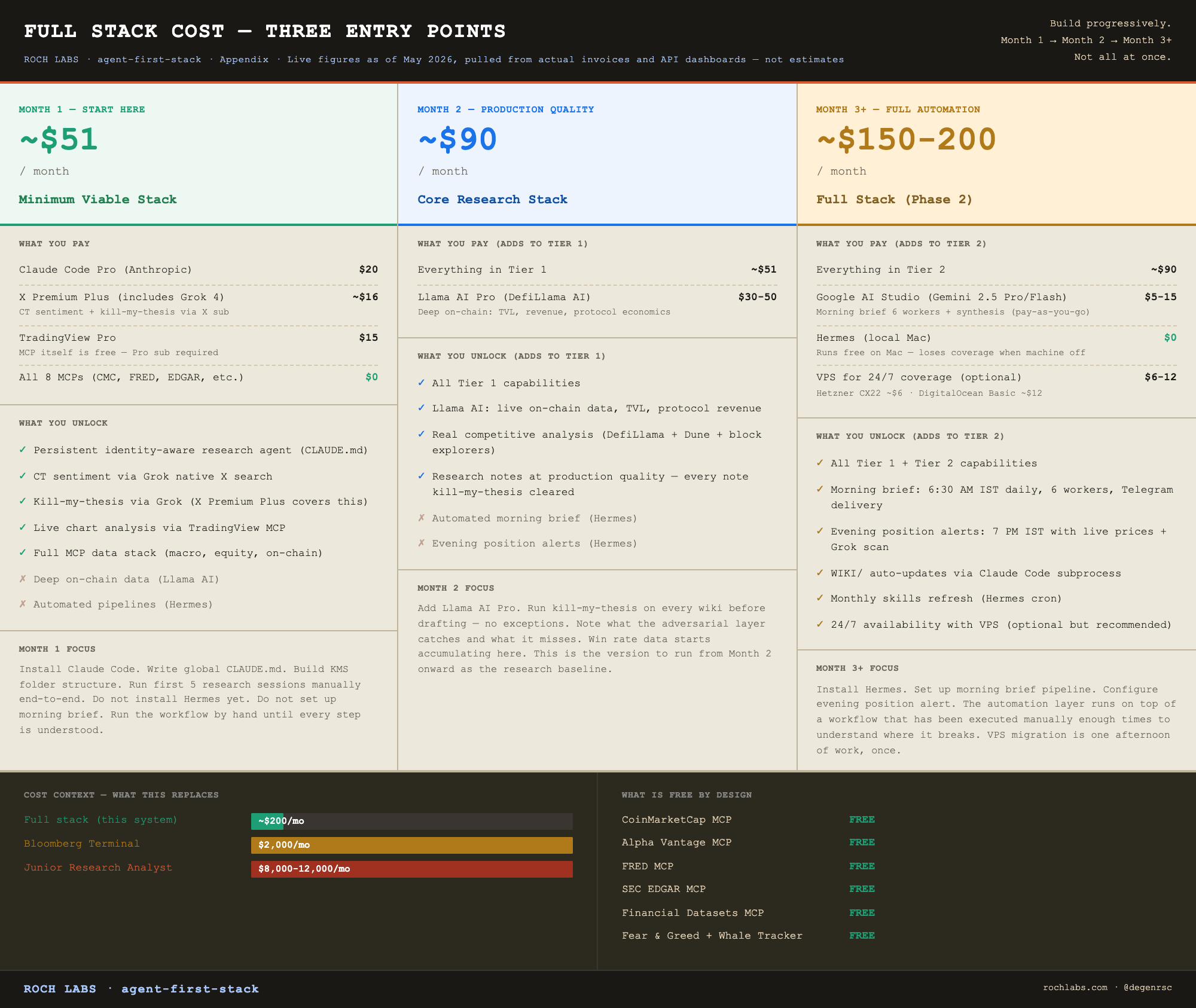
The full monthly cost of the stack, line by line. These are live figures as of May 2026, pulled from actual invoices and API dashboards, not estimates.
Complete cost table
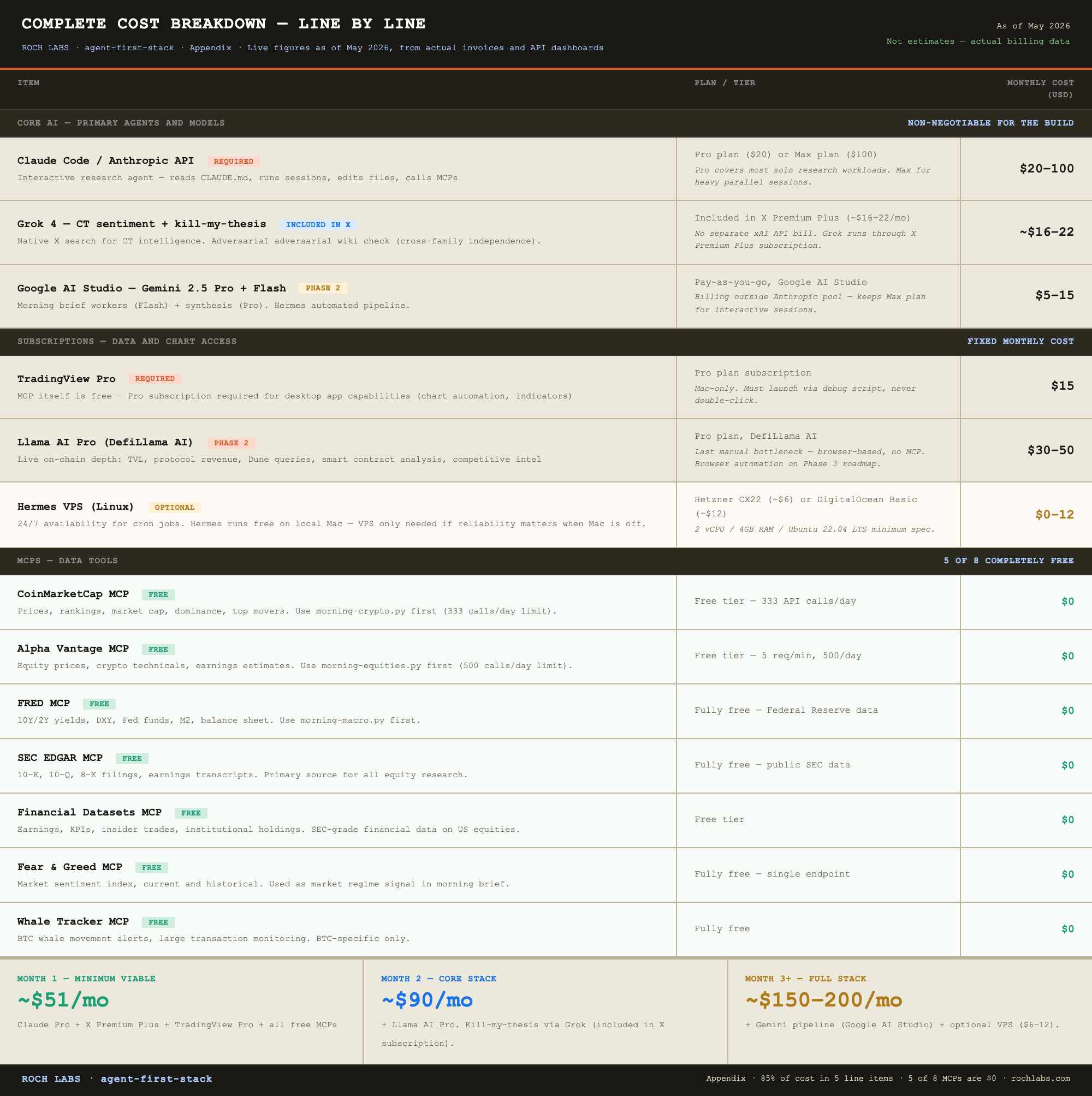
The three entry points
Minimum viable stack: ~$51/month
Claude Code Pro ($20) + X Premium Plus for Grok access (~$16) + TradingView Pro ($15).
This gives you: a persistent identity-aware research agent, CT sentiment analysis via Grok’s native X search (included in your X Premium Plus subscription, no separate API cost), and professional chart analysis via TradingView MCP (the MCP itself is free, you pay for the TradingView Pro subscription). Hermes runs locally on your Mac at no additional cost, though you lose it when the machine is off or asleep. It does not include Llama AI or kill-my-thesis adversarial checks. It is the right starting point for the first month while the KMS and research workflow are being built.
One important note on Grok: X Premium Plus gives you Grok 4 access and, through Hermes’s integration with the xAI API, the ability to run real-time X data research from within the Hermes agent. This is not a separate API subscription, it is the same access you already have from your X subscription, wired into the automation layer.
Core research stack: ~$90/month
Minimum viable stack plus Llama AI Pro ($30-50). Kill-my-thesis uses Grok 4, which runs through your existing X Premium Plus subscription at no additional cost.
This is the version that produces research at production quality. The adversarial layer is live. The deepest on-chain data source is accessible. The win rate improvement from the kill-my-thesis layer pays for the additional cost many times over across a year of publishing. This is the stack to run from month two onward.
Full stack: ~$150-200/month
Core stack plus Hermes full automation, morning brief pipeline (Grok W1 via X Premium Plus, Gemini Flash data workers, Gemini Pro synthesis, Gemini Flash validation), evening position alert, and monthly skills refresh. Add a VPS ($6-12) if you want 24/7 availability independent of your local machine, otherwise Hermes runs on your Mac and the cron jobs miss windows when the machine is off.
This is Phase 2. The intelligence infrastructure runs without you. The research pipeline still requires human initiation and judgment. The cost delta from core to full is primarily the Google AI Studio billing for the Gemini morning brief pipeline and the optional VPS. At 30 research notes per month, the Grok cost across CT sentiment and kill-my-thesis runs is covered by your X Premium Plus subscription. Everything else is fixed.
The progressive build path
Month 1 (~$51): Install Claude Code. Activate X Premium Plus if not already on it (unlocks Grok). Set up TradingView Pro. Build the KMS folder structure. Write the global CLAUDE.md and run the first five research sessions manually end to end. Do not install Hermes yet. Do not set up the morning brief. Run the workflow by hand, slowly, until every step is understood.
Month 2 ($90): Add Llama AI Pro. Run kill-my-thesis on every wiki before drafting, no exceptions. It uses Grok 4 through your existing X Premium Plus subscription, so there is no additional API cost. Note what the adversarial layer catches and what it misses. The win rate data starts accumulating here.
Month 3+ ($200): Install Hermes. Set up the morning brief pipeline. Configure the evening position alert. The automation layer runs on top of a workflow that has been executed manually enough times to understand where it breaks.
The path is Phase 1 before Phase 2. The cost table is designed to be entered progressively, not all at once.
What free covers
Five of the eight MCPs in the stack cost nothing: FRED, SEC EDGAR, Financial Datasets, Fear & Greed, and Whale Tracker are fully free. CoinMarketCap and Alpha Vantage are free tier with usage limits (333 calls/day and 500 calls/day respectively) that a solo research operation does not exceed when the data scripts are used correctly. All seven are effectively zero cost in practice.
The real cost of the stack is concentrated in five items: Claude Code / Anthropic API, xAI via X Premium Plus for Grok, Google AI Studio for Gemini, Llama AI Pro subscription, and the optional Hermes VPS. Those five items account for roughly 85% of the total monthly cost at full stack.
TradingView Pro is the only MCP-adjacent cost that requires a paid subscription. The MCP itself is free, it connects to your existing TradingView desktop application via remote debug mode. Pro is the minimum subscription tier that provides the chart capabilities used in this stack. Grok access, if you are already on X Premium Plus, costs nothing additional, it is part of that subscription and wires directly into Hermes.
Conclusion
This is the entire setup, and how I use claude code + Hermes to turn my research work into a fully agent first workflow.
My end game is to build a one-person agentic research studio with multiple agents with their own unique personas - think a trader agent, a macro agent, a prediction market agent, a fundamental analyst agent, a crypto onchain detective agent, a sales agent, a marketing agent, and an operations agent…not to mention an agent who acts like my Chief of Staff.
Still very early in that vision, and might take months to really fructify but I’m in no hurry. One thing is for sure, the agentic workloads have turned me into a better analyst, and it feels like playing a video game w/ multiple agents as your hands and legs as you navigate the game of markets, investing, and research.
Thanks for reading.